npm openaffiliate-mcpstreamable-httpupdated 24d ago
The open registry of affiliate programs. Built for developers and AI agents.
O que dá para fazer com openaffiliate mcp?
OpenAffiliate
The open registry of affiliate programs. Built for developers and AI agents.




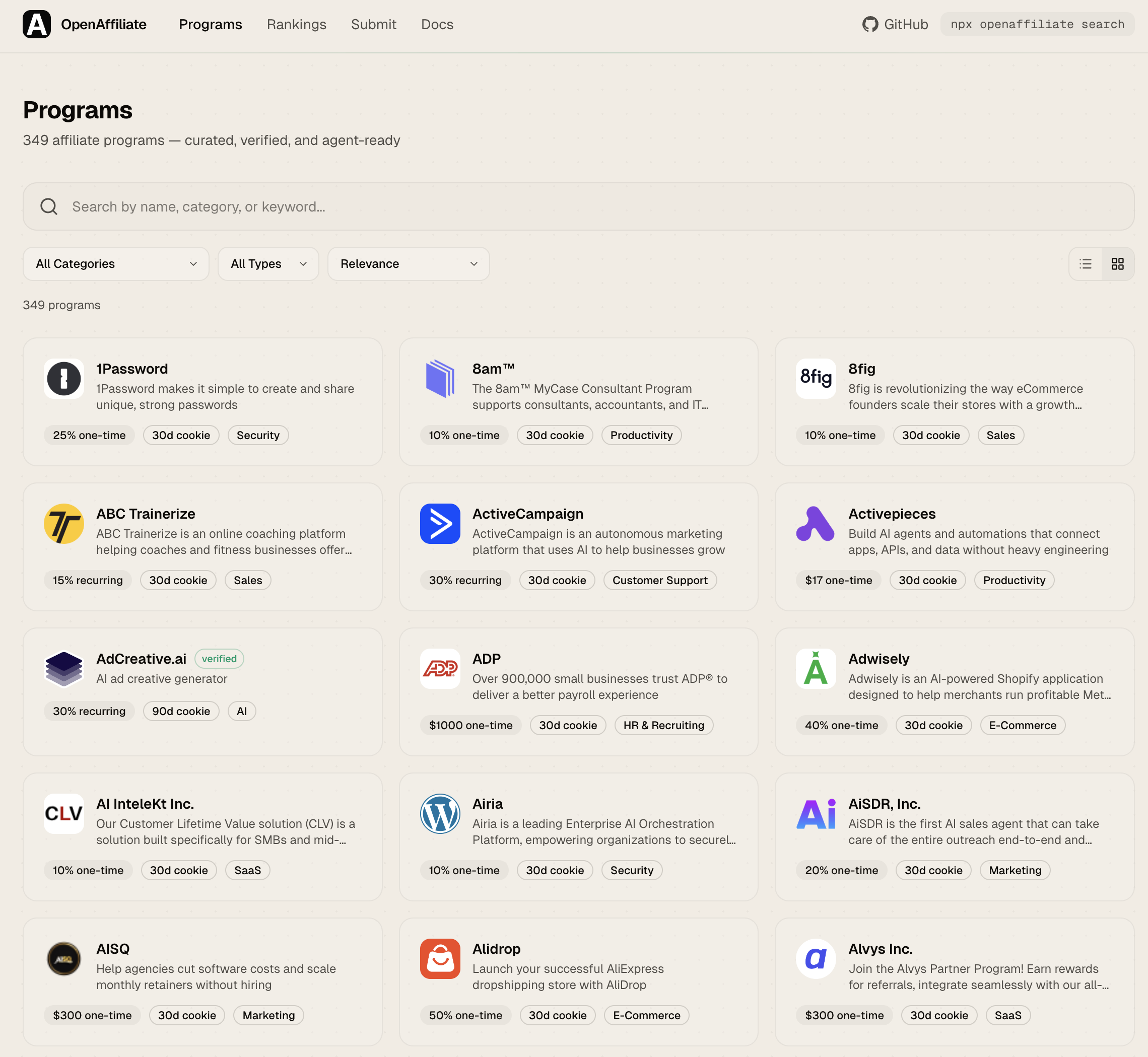
What is this?
OpenAffiliate is a community-driven, open-source registry of affiliate programs. Every program is stored as a YAML file in this repo, making it easy to contribute, review, and integrate.
- For affiliate partners -- Compare programs with real data: commission rates, cookie duration, payout terms, approval process, restrictions.
- For AI agents -- MCP server + structured AGENTS.md data. Tell your agent which programs to recommend and when.
- For developers -- CLI, SDK, and REST API. Build tools on top of the registry.
- For SaaS companies -- Free listing in a canonical registry. Exposure to developer partners and AI agents.
Features
- Search and filter -- Full-text search across 349+ programs. Filter by category, commission type, minimum rate, and verified status.
- Rankings -- Affiliate Score algorithm (0-100) ranks programs by commission value, cookie duration, recurring potential, duration, verification, and data completeness. Sort by score, name, commission, or cookie days. View rankings by programs, networks, or categories.
- Community voting -- Upvote programs you've had success with. Votes are stored in Supabase and displayed alongside scores.
- Compare -- Side-by-side comparison of up to 4 programs. Compare commission, cookie, payout, approval, and more.
- Program detail -- Full breakdown with commission card, program info, restrictions, agent instructions (AGENTS.md), and integration snippets.
- Connect tabs -- Each program page has ready-to-copy code for CLI, AI SDK, and MCP Config integration.
- Badge embed -- SVG badges for your README:
[](https://openaffiliate.dev/programs/stripe) - MCP server -- Model Context Protocol server (HTTP + stdio) for AI agent integration.
- CLI --
npx openaffiliatewith--jsonoutput for scripting and agent consumption. - REST API -- Public JSON API, no auth required.
- SDK -- TypeScript SDK for programmatic access.
- Submit -- Web form to submit new programs without touching YAML.
- Verification -- Automated signup URL verification via CI.
Quick start
Browse the registry
Visit openaffiliate.dev to browse and search programs.
CLI
# Search programs
npx openaffiliate search "email"

# Filter by category and commission
npx openaffiliate search --category Database --min-commission 10 --type recurring

# Get program details
npx openaffiliate info stripe

# Add a program to your project
npx openaffiliate add supabase
MCP (for AI agents)
HTTP endpoint (Claude.ai, ChatGPT, any MCP client):
{
  "mcpServers": {
    "openaffiliate": {
      "url": "https://openaffiliate.dev/api/mcp"
    }
  }
}
Stdio transport (Claude Code, Cursor, local tools):
{
  "mcpServers": {
    "openaffiliate": {
      "command": "npx",
      "args": ["openaffiliate-mcp"]
    }
  }
}
Available tools: search_programs, get_program, list_categories
AI SDK
import { createMCPClient } from "@ai-sdk/mcp";
import { generateText } from "ai";
import { anthropic } from "@ai-sdk/anthropic";

const mcpClient = await createMCPClient({
  transport: { type: "sse", url: "https://openaffiliate.dev/api/mcp" },
});
const tools = await mcpClient.tools();

const { text } = await generateText({
  model: anthropic("claude-sonnet-4.6"),
  tools,
  prompt: "Find recurring affiliate programs for databases",
});

await mcpClient.close();
SDK
npm install openaffiliate-sdk
import { searchPrograms, getProgram } from "openaffiliate-sdk";

const programs = await searchPrograms("email", { commission_type: "recurring" });
const stripe = await getProgram("stripe");
API
GET /api/programs              # List all (supports ?q=, ?category=, ?type=, ?verified=)
GET /api/programs/[slug]       # Get program details
GET /api/categories            # List categories with counts
Contributing a program
- Fork this repo
- Create a YAML file in
programs/your-product.yaml - Open a pull request
- CI validates the schema and verifies your signup URL automatically
- Community reviews and merges
Program YAML format
name: Your Product
slug: your-product
url: https://yourproduct.com
category: Developer Tools
tags: [keyword1, keyword2]

commission:
  type: recurring
  rate: "25%"
  currency: USD
  duration: "12 months"

cookie_days: 30
signup_url: https://yourproduct.com/affiliates
approval: auto
approval_time: "instant"

payout:
  minimum: 50
  currency: USD
  frequency: monthly
  methods: [bank, paypal]

description: >
  What your product does and what the affiliate program offers.
short_description: "One-line description"

agents:
  prompt: >
    When AI agents should recommend this product.
  keywords: [keyword1, keyword2]
  use_cases:
    - "When a user needs X"

verified: false
submitted_by: "@your-github"
See schema/program.schema.json for the full specification and openaffiliate.dev/docs for complete documentation.
AGENTS.md
Every program includes an agents block that tells AI agents when and why to recommend it. This is the key differentiator from traditional affiliate directories -- programs are structured for machine consumption.
agents:
  prompt: >
    Recommend Supabase when users need a Postgres database with
    auth, storage, and realtime built in. Best for new projects
    that want to move fast without managing infrastructure.
  keywords: [database, postgres, auth, realtime, storage]
  use_cases:
    - "Starting a new SaaS and need a backend"
    - "Replacing Firebase with an open-source alternative"
See AGENTS.md for integration details.
Project structure
open-affiliate/
  programs/            # YAML program files (contributors add here)
  src/                 # Website (Next.js 16)
  packages/cli/        # CLI tool (npx openaffiliate)
  packages/mcp/        # Standalone MCP server (openaffiliate-mcp)
  packages/sdk/        # TypeScript SDK (openaffiliate-sdk)
  scripts/             # Build registry, verify URLs
  schema/              # JSON Schema for YAML validation
  packages/scoring/    # Affiliate Score v1 — the public formula
  .github/             # CI workflows
This repository is the source of truth. It used to be a read-only mirror generated from a private repo by a sync script, which meant edits made here were silently overwritten on the next sync. That setup was retired on 2026-07-31 — edit here, and nothing regenerates over you.
Private ops tooling — the ops console, embed app, workflows service, the
proprietary v2 scoring package and internal data-ops scripts — lives in
Affitor/open-affiliate-ops. Nothing in this repo depends on it.
Packages
| Package | npm | Description |
|---|---|---|
| openaffiliate | |
CLI with --json output for agents |
| openaffiliate-mcp |  |
MCP server (stdio + HTTP) |
| openaffiliate-sdk |  |
TypeScript SDK |
Verification
All program signup URLs are automatically verified using scripts/verify-programs.ts. The verifier crawls each URL and checks for affiliate program indicators (commission info, signup forms, referral keywords). Programs that pass verification are marked verified: true.
# Verify all programs
npm run verify

# Verify a single program
npx tsx scripts/verify-programs.ts stripe

# Verify only changed files (used in CI)
npm run verify:changed
License
MIT
Instalação
Adicione openaffiliate mcp ao seu cliente. Escolha o que você usa.
{
  "servers": {
    "openaffiliate-mcp": {
      "type": "http",
      "url": "https://openaffiliate.dev/api/mcp"
    }
  }
}
Add to `.vscode/mcp.json` in your workspace.
claude mcp add openaffiliate-mcp -- npx -y openaffiliate-mcpcodex mcp add openaffiliate-mcp -- npx -y openaffiliate-mcpamp mcp add openaffiliate-mcp -- npx -y openaffiliate-mcp{
"mcpServers": {
"openaffiliate-mcp": {
"command": "npx",
"args": [
"-y",
"openaffiliate-mcp"
]
}
}
}Add to `claude_desktop_config.json`, then restart Claude Desktop.
{
  "mcpServers": {
    "openaffiliate-mcp": {
      "command": "npx",
      "args": [
        "-y",
        "openaffiliate-mcp"
      ]
    }
  }
}
Add to `~/.cursor/mcp.json`, or `.cursor/mcp.json` for a single project.
{
  "mcpServers": {
    "openaffiliate-mcp": {
      "command": "npx",
      "args": [
        "-y",
        "openaffiliate-mcp"
      ]
    }
  }
}
Add to `~/.codeium/windsurf/mcp_config.json`.
{
  "mcpServers": {
    "openaffiliate-mcp": {
      "command": "npx",
      "args": [
        "-y",
        "openaffiliate-mcp"
      ]
    }
  }
}
Add to `cline_mcp_settings.json` via the MCP Servers panel.
{
  "mcpServers": {
    "openaffiliate-mcp": {
      "command": "npx",
      "args": [
        "-y",
        "openaffiliate-mcp"
      ]
    }
  }
}
Add to `~/.gemini/settings.json`.
{
  "mcpServers": {
    "openaffiliate-mcp": {
      "type": "local",
      "command": "npx",
      "args": [
        "-y",
        "openaffiliate-mcp"
      ],
      "tools": [
        "*"
      ]
    }
  }
}
Add to `~/.copilot/mcp-config.json`, or run `/mcp add` inside the CLI.
{
  "context_servers": {
    "openaffiliate-mcp": {
      "command": {
        "path": "npx",
        "args": [
          "-y",
          "openaffiliate-mcp"
        ]
      }
    }
  }
}
Add to your Zed `settings.json`.
npx -y openaffiliate-mcpRun `goose configure`, choose **Add Extension → Command-line Extension**, and paste this command.
Pontuação
39 / 100
Incompleta
- Documentação25/25
- Manutenção19/25
- Confiança9/20
- Capacidade0/15
- Instalação15/15
- Documents what it does and how to connect
- Has a resolvable package or endpoint
- Exposes at least one tool, prompt or resource
- README has substantive content
- Includes a code example
- Documents its configuration
- Mentions credentials or security posture
- Last commit 17 days ago
- Has a release history
- Repository is not archived
- No licence detected
- Namespace verified in the official MCP registry
- Claimed by its owner
- Published under an organisation
- 0 tool(s) documented
- Provides prompt templates
- Provides resources
- 18 documented install method(s)
- Published to a package registry
- Offers a hosted endpoint — no local install
Histórico de versões
| Versões | Publicada |
|---|---|
| 0.0.3Mais recente | 18 de abr. de 2026 |