npm crypto-quant-signal-mcpstreamable-httpMITupdated 8d ago
AlgoVault is the brain layer for AI trading agents — one MCP call returns verdict, confidence, and regime across major crypto perpetual venues.
AlgoVault — Crypto Quant Trade Calls 能做什么?
Quick start (30 seconds)
No code. No API key. No install. The server speaks Streamable HTTP at https://api.algovault.com/mcp — any Model Context Protocol client connects directly.
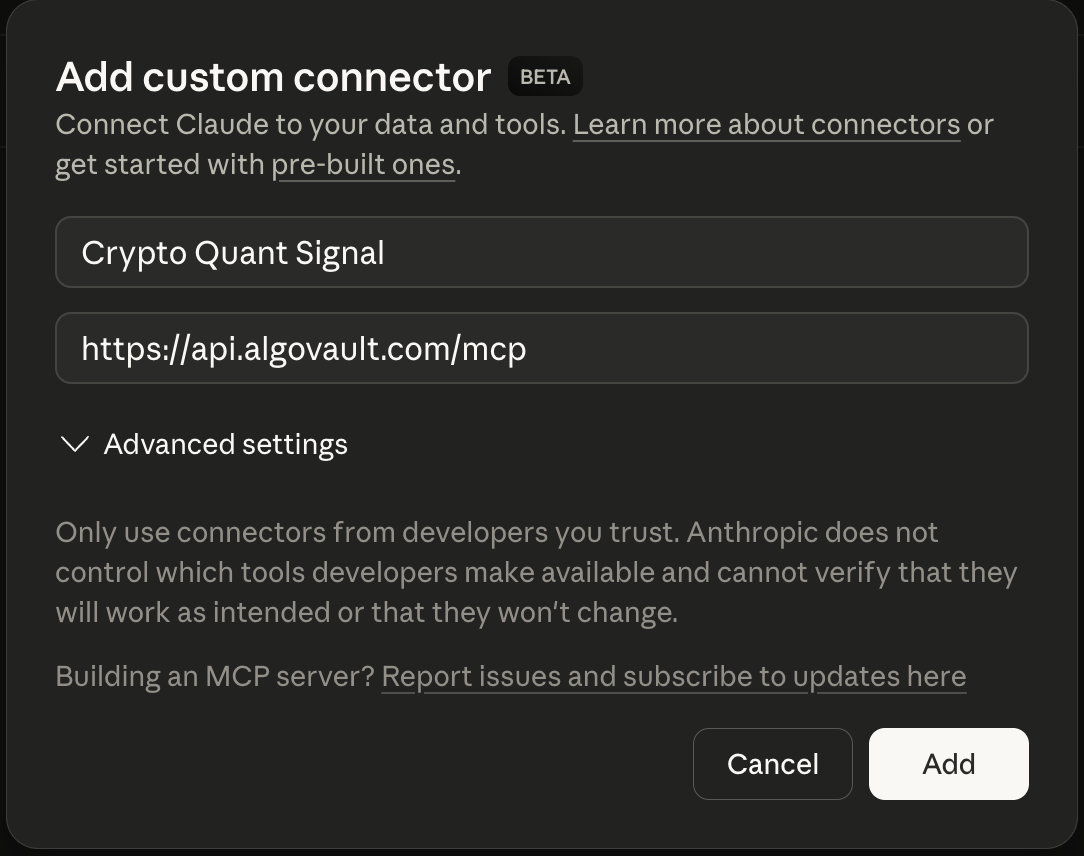
1. Add the connector. In Claude → Settings → Connectors → Add custom connector:
| Field | Value |
|---|---|
| Name | Crypto Quant Signal |
| URL | https://api.algovault.com/mcp |
2. Ask for a call. In plain language:
"Get me a trade call for ETH on the 4h timeframe"
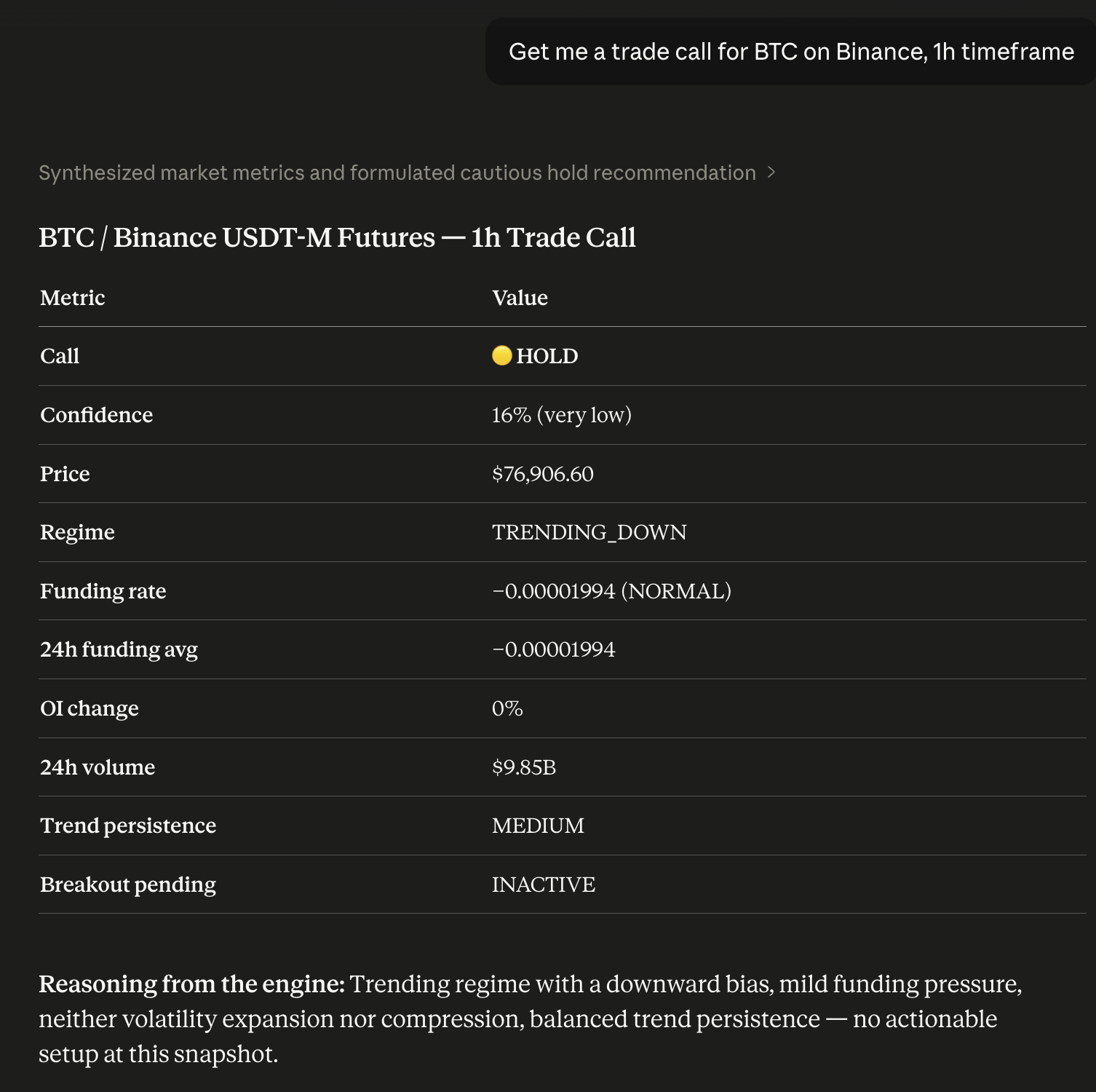
Your Claude now has a quant analyst built in. Prefer local? Run npx -y crypto-quant-signal-mcp.
Running locally on npm 12+? npm v12 disables dependency install scripts by default. AlgoVault's optional local SQLite mode uses the native
better-sqlite3module — if you install it into a project, runnpm approve-scripts(ornpm install --allow-scripts) to build it. The hosted HTTP transport (api.algovault.com/mcp) needs no local build.
What one call returns
One API call. One verdict. Not 8 raw indicators. get_trade_call returns a directional BUY / SELL / HOLD with a confidence score and the detected market regime — a composite verdict, not a data dump for your agent to interpret.
Under the hood, a self-tuning model fuses momentum, trend structure, derivatives positioning, open interest, and volume into one weighted call. Every call reports market regime — trending, ranging, or volatile — alongside direction and confidence. Directional calls fire only when conviction clears the threshold; roughly 99% of evaluations return HOLD.
{
  "call": "BUY",
  "confidence": 78,
  "price": 84250.50,
  "indicators": {
    "funding_rate": 0.0001,
    "funding_24h_avg": 0.00008,
    "funding_state": "NORMAL",
    "oi_change_pct": 2.4,
    "volume_24h": 2381602633,
    "trend_persistence": "HIGH",
    "breakout_pending": "INACTIVE"
  },
  "regime": "TRENDING_UP",
  "reasoning": "Trending regime, upward bias. Funding pressure mild. Volatility neither expanding nor compressed. Trend persistence elevated; momentum structure. Strong conviction from aligned signals.",
  "timestamp": 1712764800,
  "coin": "BTC",
  "timeframe": "1h",
  "also_see": [
    { "coin": "ETH", "timeframe": "1h", "confidence": 82 },
    { "coin": "SOL", "timeframe": "15m", "confidence": 73 }
  ],
  "_algovault": {
    "version": "1.28.2",
    "tool": "get_trade_call",
    "compatible_with": ["crypto-quant-risk-mcp", "crypto-quant-backtest-mcp"]
  }
}
The _algovault block makes outputs composable: downstream risk and backtest tools accept the object directly.
Live, verifiable track record
The full record is public and on-chain — no cherry-picking, no survivorship bias:
- Live dashboard — algovault.com/track-record
- Merkle batch verifier — algovault.com/verify
- Anchor contract on Base L2 —
0x6485…0f81 - All batches (raw JSON) — api.algovault.com/api/merkle-batches
AlgoVault is also a verified agent on the ERC-8004 Identity Registry (Base L2), agentId 44544 — a portable, on-chain handle AI orchestrators can resolve.
Works with your stack
AlgoVault is drop-in for every MCP-spec client, every major agent framework, and every official exchange Agent Trade Kit — no SDK, no wrapper. It serves Streamable HTTP at https://api.algovault.com/mcp; tools/list + resources/list is the API surface.
MCP clients.
| Client | Config |
|---|---|
| Claude Desktop | Settings → Connectors → Add custom connector → https://api.algovault.com/mcp |
| Claude Code (CLI) | claude mcp add crypto-quant-signal https://api.algovault.com/mcp |
| Cursor | ~/.cursor/config.json → mcpServers block → url: "https://api.algovault.com/mcp" |
| Cline | VS Code Cline extension → MCP server settings → add Streamable HTTP server |
| Codex (OpenAI CLI) | ~/.codex/config.toml → [mcp_servers.algovault] table + url = "https://api.algovault.com/mcp" (or codex mcp CLI) |
| Windsurf | ~/.codeium/windsurf/mcp_config.json → mcpServers.algovault.serverUrl = "https://api.algovault.com/mcp" |
| Continue.dev | config.yaml → mcpServers: [{ name: algovault, type: streamable-http, url: "https://api.algovault.com/mcp" }] |
| Any other MCP-spec-compliant client | Configure the Streamable HTTP transport with URL https://api.algovault.com/mcp |
Agent frameworks. First-party tutorials pair AlgoVault with each framework's canonical MCP adapter — copy-pasteable demo code, no SDK.
| Framework | Tutorial | Runnable demo | Mirror |
|---|---|---|---|
| LangChain | docs/integrations/langchain.md |
examples/langchain/demo.py |
algovault.com/integrations/langchain |
| LlamaIndex | docs/integrations/llamaindex.md |
examples/llamaindex/demo.py |
algovault.com/integrations/llamaindex |
| Microsoft Agent Framework | docs/integrations/maf.md |
examples/maf/demo.py |
algovault.com/integrations/maf |
| CrewAI | docs/integrations/crewai.md |
examples/crewai/demo.py |
algovault.com/integrations/crewai |
Each demo is runnable as python examples/<framework>/demo.py BTC 4h — gets a real BUY/SELL/HOLD verdict from api.algovault.com/mcp, prints it. ≤5 minutes to first call.
Exchange Agent Trade Kits. AlgoVault returns the analytics; your agent's risk policy decides what to execute. All demos run testnet/demo only. For Binance, the Agent OS path is the recommended default for new integrations — OAuth at connect time, no API keys on the machine; the key-based kit remains right for custom order types.
Tools & resources
The MCP tools live at https://api.algovault.com/mcp. Every asset works across the full supported timeframe range, on major crypto perpetual venues.
get_trade_call(aliasget_trade_signal) — composite BUY/SELL/HOLD verdict with confidence + regime, any asset, any timeframe.scan_trade_calls— scans the top-N perps by open interest on a venue; returns every actionable call in one shot.scan_funding_arb— cross-venue funding-rate spreads across 7 venues (Hyperliquid, Binance, Bybit, Gate, KuCoin, Aster, OKX), ranked. The only MCP server doing multi-exchange derivatives arbitrage.get_market_regime— classifies TRENDING_UP / TRENDING_DOWN / RANGING / VOLATILE for strategy selection.search_knowledge+chat_knowledge— free BM25 search and grounded Q&A over the full knowledge bundle.
Performance is exposed as a read-only MCP resource: performance://signal-performance (aggregated PFE win rate, never raw outcomes). Full parameter reference at algovault.com/docs.
Skills (20 ready-to-use Anthropic Agent Skills)
Single-prompt wrappers over 1–3 tool calls — regime gating, multi-timeframe consensus, funding-arb monitoring, and more. Install with claude plugin install AlgoVaultLabs/algovault-skills; browse at algovault.com/skills.
| # | Slug | Name | Difficulty | Tools |
|---|---|---|---|---|
| 01 | quick-btc-check |
Quick BTC Check | Beginner | get_trade_signal |
| 02 | portfolio-scanner |
Portfolio Scanner | Intermediate | get_trade_signal |
| 03 | regime-aware-trading |
Regime-Aware Trading | Intermediate | get_market_regime, get_trade_signal |
| 04 | funding-arb-monitor |
Funding Arb Monitor | Intermediate | scan_funding_arb |
| 05 | full-3-tool-pipeline |
Full 3-Tool Pipeline | Advanced | get_market_regime, get_trade_signal, scan_funding_arb |
| 06 | multi-timeframe-confirmation |
Multi-Timeframe Confirmation | Advanced | get_trade_signal |
| 07 | tradfi-rotation |
TradFi Rotation | Advanced | get_market_regime, get_trade_signal |
| 08 | risk-gated-entry |
Risk-Gated Entry | Advanced | get_market_regime, get_trade_signal |
| 09 | funding-sentiment-dashboard |
Funding Sentiment Dashboard | Advanced | get_market_regime |
| 10 | contrarian-meme-scanner |
Contrarian Meme Scanner | Advanced | get_market_regime, get_trade_signal |
| 11 | divergence-detector |
Divergence Detector | Advanced | get_market_regime, get_trade_signal |
| 12 | hourly-digest-bot |
Hourly Digest Bot | Advanced | get_trade_signal, get_market_regime |
| 13 | hedging-advisor |
Hedging Advisor | Advanced | get_market_regime, get_trade_signal, scan_funding_arb |
| 14 | volatility-breakout-watch |
Volatility Breakout Watch | Advanced | get_market_regime, get_trade_signal |
| 15 | cross-asset-correlation |
Cross-Asset Correlation | Advanced | get_trade_signal |
| 16 | funding-cash-and-carry |
Funding Cash-and-Carry | Advanced | scan_funding_arb, get_trade_signal |
| 17 | weekend-vs-weekday-patterns |
Weekend vs Weekday Patterns | Research | get_trade_signal, get_market_regime |
| 18 | agent-portfolio-rebalance |
Agent Portfolio Rebalance | Advanced | get_market_regime |
| 19 | smart-dca-bot |
Smart DCA Bot | Advanced | get_trade_signal |
| 20 | multi-agent-war-room |
Multi-Agent War Room | Expert | get_market_regime, get_trade_signal, scan_funding_arb |
Pricing
Quota-only tiers. Every tier gets all venues, all assets, all timeframes — you pay for call volume, nothing else.
Two meters per paid tier, monthly and daily, enforced independently: a call is refused when either is exhausted, and the daily window is a UTC calendar day resetting at 00:00 UTC. Quota is counted per call, regardless of verdict.
| Feature | Free | Starter ($9.99/mo · $39.90/6mo) | Pro ($49/mo · $129/6mo) | Enterprise (contact us) | x402 (per call) |
|---|---|---|---|---|---|
| Exchanges | All 15 | All 15 | All 15 | All 15 | All 15 |
| Assets | All 740+ | All 740+ | All 740+ | All 740+ | All 740+ |
| Asset classes | Crypto + TradFi | Crypto + TradFi | Crypto + TradFi | Crypto + TradFi | Crypto + TradFi |
| Timeframes | All 11 | All 11 | All 11 | All 11 | All 11 |
| Funding arb results | Top 5 | Unlimited | Unlimited | Unlimited | Unlimited |
| Track record | Full access | Full access | Full access | Full access | Full access |
| Monthly calls | 200/mo | 10,000/mo | 100,000/mo | Custom volume — contact us | Unlimited |
| Daily calls | 100/day | 1,000/day | 10,000/day | Custom volume — contact us | Unlimited |
| Price | $0 | $9.99/mo or $39.90/6mo | $49/mo or $129/6mo | Contact us | $0.01–0.05/call |
Subscriptions: Sign up at api.algovault.com/signup. Starter unlocks 10,000 calls/mo (up to 1,000/day) for $9.99/mo, or $39.90 for six months prepaid — add ?interval=6month to pick the prepay term. API key delivered instantly after checkout.
Pro 6-month is currently $129 — limited-time pricing; subscribe now and renewals keep your price.
x402 micropayments: AI agents pay per HTTP call with USDC on Base — no signup, no API key, no billing. The payment receipt is the credential. See x402.org.
What's new in v1.28.0
-
🔐 Authentication now tells you what happened. Every response carries
_algovault.auth. A well-formed but unrecognised key is refused instead of being quietly served free-tier data, and "malformed", "unknown" and "we couldn't verify" are three distinct outcomes rather than one silent fallback. -
🎛️ The published
exchangelist matches what we actually serve.get_trade_call,get_trade_signal,get_market_regimeandscan_trade_callsadvertise only publicly supported venues, so an agent can trust the enum it reads. Breaking:EDGEXandWEEXare no longer accepted — see Upgrading from v1.27.x below. -
📘 Two parameters that were always there, now documented.
assetClasson the trade-call tools andminLiquidityUsdonscan_trade_calls. Both project from the live schema, so the docs can't drift from the server — and_receiptsfields are documented from real responses. -
📗 The docs answer the question instead of pointing at it. Every
rankBylens is documented, REST is as complete as MCP, there's a proper error-code reference, and the copy-paste samples run exactly as written — CI re-checks them against the live API on every deploy. -
v1.28.1 — clearer tool descriptions for agent tool-selection;
get_trade_signalnow steers new integrations toget_trade_call. -
v1.28.2 — Pair with Binance Agent OS. One MCP client, two servers: AlgoVault returns the verdict, Binance Agent OS executes it. OAuth at connect time — no API keys on your machine, no request signing, and trading confined to an isolated sub-account you fund yourself. There is no withdrawal scope.
Upgrading from v1.27.x — one breaking change: EDGEX and WEEX are no longer valid exchange values and now return -32602. No tool was added or renamed. Check any hard-coded exchange value against the published enum, and read _algovault.auth if you branch on auth failures.
v1.27.x highlights (recap)
- 🧮 Counted per call. Your allowance covers every call the engine answers, on both the MCP and HTTP rails.
- 📶 A new call ladder. Free: 200/month plus 100/day. Starter: 10,000/month plus 1,000/day. Pro: 100,000/month plus 10,000/day.
- 💳 6-month prepay replaces annual. Starter is $39.90 (
$6.65/mo, 33% off monthly) and Pro is $129 ($21.50/mo, 56% off monthly). Pick it at signup with?interval=6month. Enterprise remains contact-us. - ⏱️ Daily limits say when they reset. Hit a daily cap and the refusal tells you the hours remaining, not a monthly figure.
v1.26.0 highlights (recap)
- 💳 Annual plans — prepay a year, save up to 49%. Starter was $79/yr (
$6.58/mo) and Pro was $299/yr ($24.92/mo). Superseded: annual was retired on 2026-08-09 and replaced by 6-month prepay (see v1.27.0);?interval=yearnow redirects to the 6-month checkout, so existing links still work.
Refresh your MCP client to pick up this release. MCP clients cache
tools/listat session start — Claude.ai/Desktop: toggle the connector off+on; Cursor/Cline: restart the MCP server connection.
Privacy
Local mode: zero telemetry — call history stays on your machine. Remote mode: request metadata logged for analytics (IP hashed, never stored raw). See the privacy policy.
License
MIT
Disclaimer: AlgoVault provides directional entry interpretation for AI agents. Exit timing is determined by your agent or strategy. This is not financial advice. Past performance does not guarantee future results.
安装
把 AlgoVault — Crypto Quant Trade Calls 添加到你的客户端。选择你正在使用的那个。
{
  "servers": {
    "crypto-quant-signal-mcp": {
      "type": "http",
      "url": "https://api.algovault.com/mcp"
    }
  }
}
Add to `.vscode/mcp.json` in your workspace.
claude mcp add crypto-quant-signal-mcp -- npx -y crypto-quant-signal-mcpcodex mcp add crypto-quant-signal-mcp -- npx -y crypto-quant-signal-mcpamp mcp add crypto-quant-signal-mcp -- npx -y crypto-quant-signal-mcp{
"mcpServers": {
"crypto-quant-signal-mcp": {
"command": "npx",
"args": [
"-y",
"crypto-quant-signal-mcp"
]
}
}
}Add to `claude_desktop_config.json`, then restart Claude Desktop.
{
  "mcpServers": {
    "crypto-quant-signal-mcp": {
      "command": "npx",
      "args": [
        "-y",
        "crypto-quant-signal-mcp"
      ]
    }
  }
}
Add to `~/.cursor/mcp.json`, or `.cursor/mcp.json` for a single project.
{
  "mcpServers": {
    "crypto-quant-signal-mcp": {
      "command": "npx",
      "args": [
        "-y",
        "crypto-quant-signal-mcp"
      ]
    }
  }
}
Add to `~/.codeium/windsurf/mcp_config.json`.
{
  "mcpServers": {
    "crypto-quant-signal-mcp": {
      "command": "npx",
      "args": [
        "-y",
        "crypto-quant-signal-mcp"
      ]
    }
  }
}
Add to `cline_mcp_settings.json` via the MCP Servers panel.
{
  "mcpServers": {
    "crypto-quant-signal-mcp": {
      "command": "npx",
      "args": [
        "-y",
        "crypto-quant-signal-mcp"
      ]
    }
  }
}
Add to `~/.gemini/settings.json`.
{
  "mcpServers": {
    "crypto-quant-signal-mcp": {
      "type": "local",
      "command": "npx",
      "args": [
        "-y",
        "crypto-quant-signal-mcp"
      ],
      "tools": [
        "*"
      ]
    }
  }
}
Add to `~/.copilot/mcp-config.json`, or run `/mcp add` inside the CLI.
{
  "context_servers": {
    "crypto-quant-signal-mcp": {
      "command": {
        "path": "npx",
        "args": [
          "-y",
          "crypto-quant-signal-mcp"
        ]
      }
    }
  }
}
Add to your Zed `settings.json`.
npx -y crypto-quant-signal-mcpRun `goose configure`, choose **Add Extension → Command-line Extension**, and paste this command.
评分
39 / 100
不完整
- 文档25/25
- 维护25/25
- 可信度16/20
- 能力0/15
- 安装体验15/15
- Documents what it does and how to connect
- Has a resolvable package or endpoint
- Exposes at least one tool, prompt or resource
- README has substantive content
- Includes a code example
- Documents its configuration
- Mentions credentials or security posture
- Last commit 0 days ago
- Has a release history
- Repository is not archived
- Licensed MIT
- Namespace verified in the official MCP registry
- Claimed by its owner
- Published under an organisation
- 0 tool(s) documented
- Provides prompt templates
- Provides resources
- 18 documented install method(s)
- Published to a package registry
- Offers a hosted endpoint — no local install
版本历史
| 版本 | 发布于 |
|---|---|
| 1.28.2最新 | 2026年8月27日 |
| 1.28.1 | 2026年8月24日 |
| 1.28.0 | 2026年8月22日 |
| 1.27.0 | 2026年8月10日 |
| 1.26.0 | 2026年8月6日 |
| 1.25.0 | 2026年8月2日 |
| 1.24.1 | 2026年7月25日 |
| 1.24.0 | 2026年7月25日 |
| 1.23.3 | 2026年7月18日 |
| 1.23.2 | 2026年7月17日 |
| 1.23.1 | 2026年7月14日 |
| 1.23.0 | 2026年7月4日 |
| 1.22.1 | 2026年6月30日 |
| 1.21.0 | 2026年6月28日 |
| 1.20.0 | 2026年6月4日 |
| 1.19.1 | 2026年5月31日 |
| 1.19.0 | 2026年5月30日 |
| 1.18.2 | 2026年5月25日 |
| 1.18.1 | 2026年5月23日 |
| 1.18.0 | 2026年5月23日 |
| 1.17.0 | 2026年5月21日 |
| 1.16.0 | 2026年5月19日 |
| 1.15.1 | 2026年5月18日 |
| 1.15.0 | 2026年5月18日 |
| 1.14.0 | 2026年5月18日 |
| 1.11.1 | 2026年5月15日 |
| 1.10.8 | 2026年5月8日 |
| 1.10.4 | 2026年4月30日 |
| 1.8.1 | 2026年4月14日 |
| 1.7.0 | 2026年4月11日 |
| 1.6.1 | 2026年4月10日 |
| 1.6.0 | 2026年4月10日 |
| 1.4.0 | 2026年4月8日 |
| 1.2.0 | 2026年4月7日 |
| 1.1.1 | 2026年4月7日 |
| 1.1.0 | 2026年4月6日 |