
npm @bmbrick/agent-mosaic-skillstdioupdated 3mo ago
Convert any local photo into a LEGO-style brick mosaic preview — directly from your AI agent.
What can you do with agent mosaic skill?
BMBrick Photo-to-LEGO-Mosaic Skill


Convert any local photo into a LEGO-style brick mosaic preview — directly from your AI agent.
@bmbrick/photo-to-lego-mosaic-skill is an MCP server that lets Claude, Cursor, Windsurf, and other AI agents transform local images into high-fidelity 3D brick mosaics using the same canonical engine as bmbrick.com.
Renamed from
@bmbrick/agent-mosaic-skill(the old name still works but is deprecated — please migrate to the new name for future updates).
Visual Previews
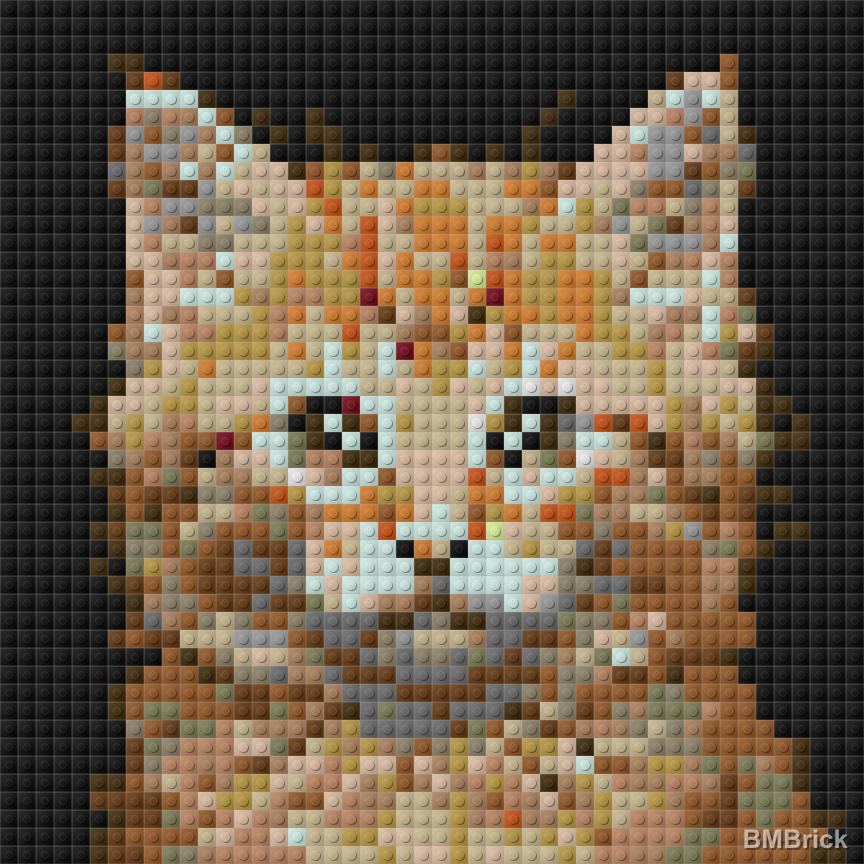
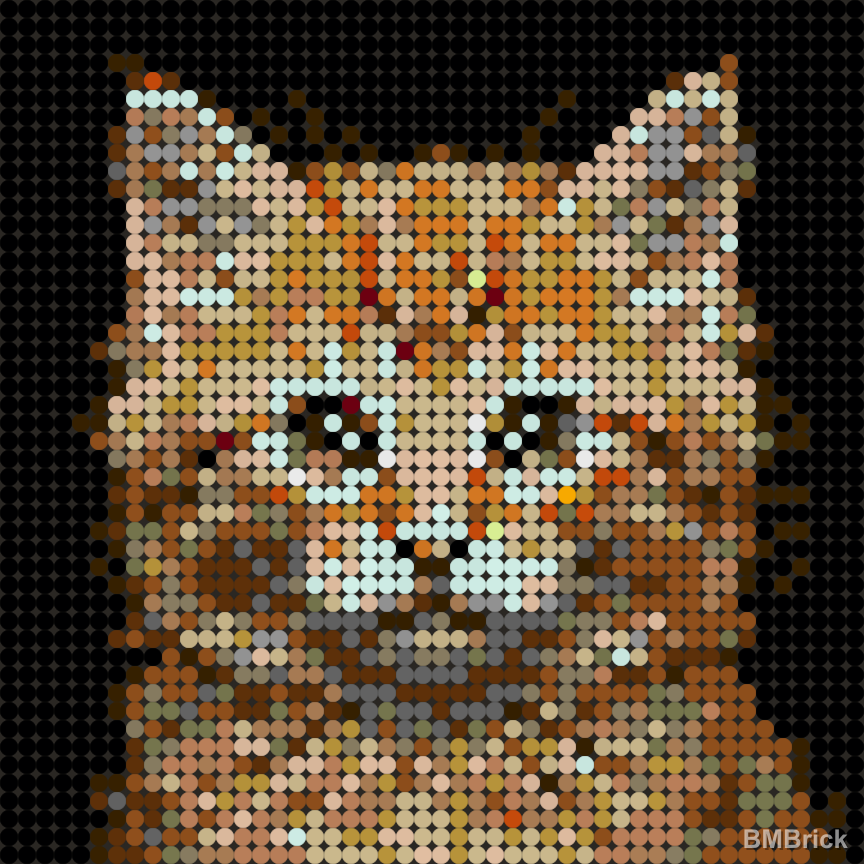
Generated with the generate_lego_mosaic tool (3D render mode):
Square Tiles (square_1x1)
| Original Photo | 48x48 Preview | 64x64 Preview |
|---|---|---|
 |
 |
 |
Round Tiles (round_1x1)
| Original Photo | 48x48 Preview | 64x64 Preview |
|---|---|---|
|
 |
 |
For more case studies and mosaic examples, check out our Pinterest Showcase.
Quick Start
npx -y @bmbrick/photo-to-lego-mosaic-skill
MCP Client Configuration
Claude Desktop (claude_desktop_config.json):
{
  "mcpServers": {
    "lego-mosaic": {
      "command": "npx",
      "args": ["-y", "@bmbrick/photo-to-lego-mosaic-skill"]
    }
  }
}
Cursor (.cursor/mcp.json):
{
  "mcpServers": {
    "lego-mosaic": {
      "command": "npx",
      "args": ["-y", "@bmbrick/photo-to-lego-mosaic-skill"]
    }
  }
}
Tool: generate_lego_mosaic
| Parameter | Type | Required | Default | Description |
|---|---|---|---|---|
imagePath |
string | Yes | — | Absolute path to a local image |
columns |
number | No | 48 | Preview width in studs (max 64) |
rows |
number | No | 48 | Preview height in studs (max 64) |
materialMode |
string | No | square_1x1 |
square_1x1 or round_1x1 |
renderMode |
string | No | 3D |
Render style |
removeBackground |
boolean | No | false | Clean up white/transparent backgrounds |
Returns: a local watermarked PNG preview + a link to unlock the full project at bmbrick.com.
Unlock Full Project
The preview is watermarked and intended for creative exploration. To get the complete deliverables — HD unwatermarked mosaic, brick-by-brick PDF instructions, parts list with ordering links, and CSV/XML placement matrices — visit bmbrick.com.
Features
- Same Engine as bmbrick.com — canonical color science, quantization, and 3D rendering pipeline
- Local & Private — all processing happens on your machine via Node.js
- Agent-Ready — ships with a
SKILL.mdfor seamless agent workflow integration - 3D Render Mode — InstancedMesh PBR rendering with realistic brick studs
Engineering Docs
Deep technical reference for the color quantization pipeline that powers this skill and bmbrick.com:
- Color quantization pipeline: principles, history, and lessons — current architecture, architectural decisions, verified principles, failed experiments from 25+ versions of iteration, and parameter sensitivity reference.
Migrating from @bmbrick/agent-mosaic-skill
If you were using the old name, the migration is one search/replace:
- Package name:
@bmbrick/agent-mosaic-skill→@bmbrick/photo-to-lego-mosaic-skill - MCP tool name (in your agent's tool list):
generate_bmbrick_mosaic→generate_lego_mosaic - Binary name (rare):
agent-mosaic-skill→photo-to-lego-mosaic-skill
The tool parameters (imagePath, columns, rows, etc.) and return shape are unchanged.
Development
License
Dual-licensed:
- MIT — MCP wrapper,
skill/directory, agent integration surface - Restricted —
dist/engine files: free to use and distribute as-is, but no de-obfuscation, reverse engineering, or redistribution of modified versions
See LICENSE for full terms.
Install
Add agent mosaic skill to your client. Pick the one you use.
claude mcp add agent-mosaic-skill -- npx -y @bmbrick/agent-mosaic-skillcodex mcp add agent-mosaic-skill -- npx -y @bmbrick/agent-mosaic-skillamp mcp add agent-mosaic-skill -- npx -y @bmbrick/agent-mosaic-skill{
"mcpServers": {
"agent-mosaic-skill": {
"command": "npx",
"args": [
"-y",
"@bmbrick/agent-mosaic-skill"
]
}
}
}Add to `claude_desktop_config.json`, then restart Claude Desktop.
{
  "mcpServers": {
    "agent-mosaic-skill": {
      "command": "npx",
      "args": [
        "-y",
        "@bmbrick/agent-mosaic-skill"
      ]
    }
  }
}
Add to `~/.cursor/mcp.json`, or `.cursor/mcp.json` for a single project.
code --add-mcp '{"name":"agent-mosaic-skill","command":"npx","args":["-y","@bmbrick/agent-mosaic-skill"]}'Or add the block manually to `.vscode/mcp.json` under `servers`.
{
  "mcpServers": {
    "agent-mosaic-skill": {
      "command": "npx",
      "args": [
        "-y",
        "@bmbrick/agent-mosaic-skill"
      ]
    }
  }
}
Add to `~/.codeium/windsurf/mcp_config.json`.
{
  "mcpServers": {
    "agent-mosaic-skill": {
      "command": "npx",
      "args": [
        "-y",
        "@bmbrick/agent-mosaic-skill"
      ]
    }
  }
}
Add to `cline_mcp_settings.json` via the MCP Servers panel.
{
  "mcpServers": {
    "agent-mosaic-skill": {
      "command": "npx",
      "args": [
        "-y",
        "@bmbrick/agent-mosaic-skill"
      ]
    }
  }
}
Add to `~/.gemini/settings.json`.
{
  "mcpServers": {
    "agent-mosaic-skill": {
      "type": "local",
      "command": "npx",
      "args": [
        "-y",
        "@bmbrick/agent-mosaic-skill"
      ],
      "tools": [
        "*"
      ]
    }
  }
}
Add to `~/.copilot/mcp-config.json`, or run `/mcp add` inside the CLI.
{
  "context_servers": {
    "agent-mosaic-skill": {
      "command": {
        "path": "npx",
        "args": [
          "-y",
          "@bmbrick/agent-mosaic-skill"
        ]
      }
    }
  }
}
Add to your Zed `settings.json`.
npx -y @bmbrick/agent-mosaic-skillRun `goose configure`, choose **Add Extension → Command-line Extension**, and paste this command.
4 tools
agent mosaic skill exposes 4 tools to a connected agent.
- imagePath
- string
- materialMode
- string
- renderMode
- string
- removeBackground
- boolean
Score
58 / 100
Adequate
- Documentation21/25
- Maintenance13/25
- Trust6/20
- Capability6/15
- Install experience12/15
- Documents what it does and how to connect
- Has a resolvable package or endpoint
- Exposes at least one tool, prompt or resource
- README has substantive content
- Includes a code example
- Documents its configuration
- Mentions credentials or security posture
- Last commit 98 days ago
- Has a release history
- Repository is not archived
- No licence detected
- Namespace verified in the official MCP registry
- Claimed by its owner
- Published under an organisation
- 4 tool(s) documented
- Provides prompt templates
- Provides resources
- 12 documented install method(s)
- Published to a package registry
- Offers a hosted endpoint — no local install
Version history
| Versions | Published |
|---|---|
| 1.0.2Latest | May 12, 2026 |