
pypi horizun-pbi-mcpstdioApache-2.0updated 10d ago
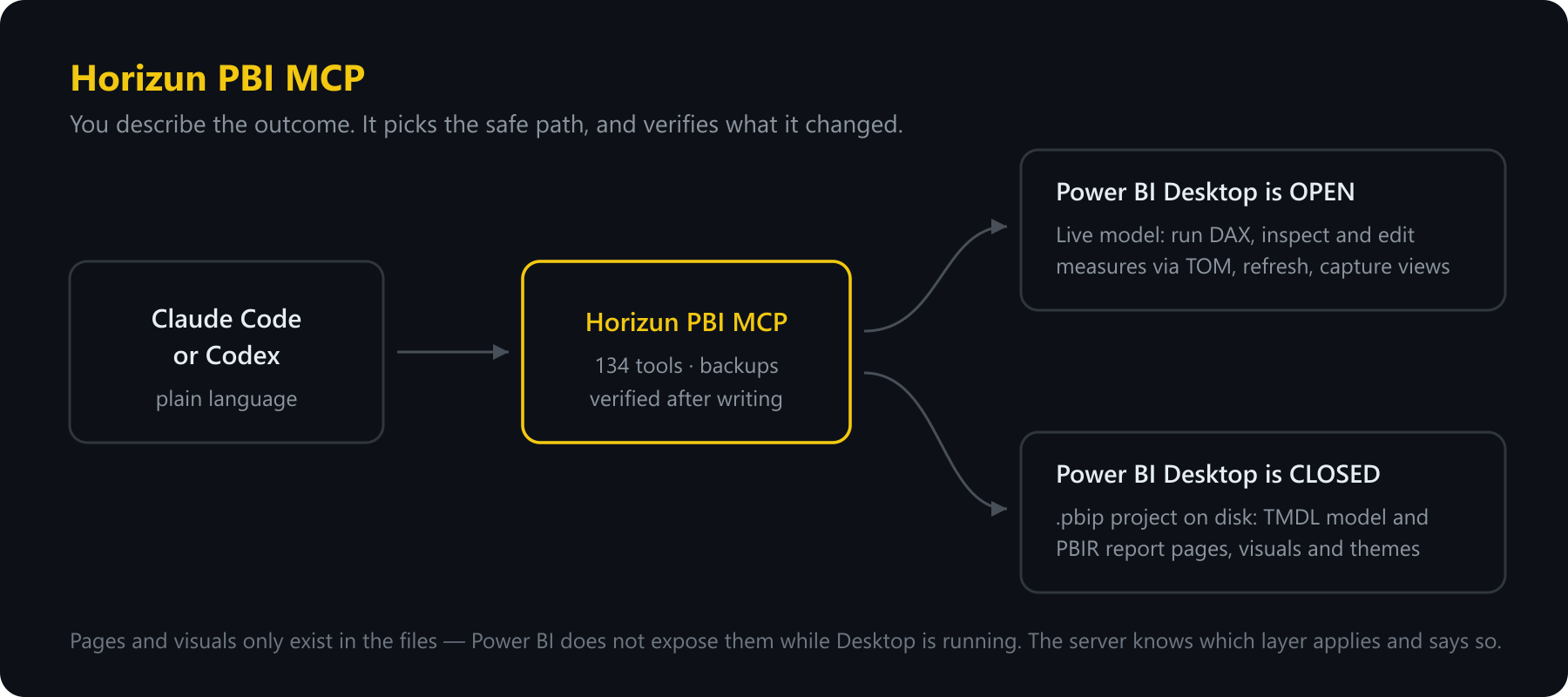
Build and fix Power BI reports by describing what you want. Ask in plain language; the server runs the DAX, edits the model, writes the report pages — and checks its own work afterwards.
What can you do with Horizun PBI MCP?
Horizun PBI MCP




Build and fix Power BI reports by describing what you want. Ask in plain language; the server runs the DAX, edits the model, writes the report pages — and checks its own work afterwards.
v2.1.0 · 139 tools · Windows · Python 3.10+ · Claude Code, Codex, any MCP client
New to the project? Start with what this Power BI MCP is, when to use it, and what it deliberately does not do.
Install
No repository clone, manual DLL download or .mcp.json editing is required.
Pick the line that matches you.
Claude Code
claude plugin marketplace add HorizunGroup/horizun-pbi-mcp
claude plugin install horizun-pbi-mcp@horizun
Codex
codex plugin marketplace add HorizunGroup/horizun-pbi-mcp
Then open /plugins, pick the Horizun marketplace and install
horizun-pbi-mcp.
Or just ask the agent — easiest of all
Paste this into Claude Code or Codex and let it install itself:
Install Horizun PBI MCP from
HorizunGroup/horizun-pbi-mcp. Complete the runtime setup, watchpbi_install_statusuntil it reportsready, restart the session, and confirm the 139pbi_*tools are available.
A brand-new Windows PC
One paste in PowerShell installs the prerequisites first — version-pinned and
SHA-256 verified, no administrator rights. See docs/INSTALL.md.
Finishing up
The first setup downloads the runtime and takes a few minutes. Run
pbi_install_status until it says ready, then restart your client once so the
tools load. If anything looks stuck, docs/INSTALL.md covers
repair and offline installs.
Your first minute
- Open Power BI Desktop with any report.
- Ask: "List the Power BI models that are open and connect to the first one."
- Ask: "Run a read-only DAX query that returns revenue by month for this year."
If step 2 answers, everything works.
Things worth asking for
Audit this PBIP project and explain the highest-risk issues before changing anything.
This measure returns blank for December. Find out why.
Create a report page from this specification, validate it, and show me the layout.
Document every measure in the model and export it to Excel.
What it provides
| Area | Capabilities |
|---|---|
| Live model | Discover Desktop sessions, run DAX, inspect metadata, refresh, and manage measures through TOM |
| Semantic model | Read and edit TMDL tables, columns, measures, relationships, roles and calculation groups |
| Report authoring | Create pages and visuals, clone templates, arrange layouts, apply themes, bookmarks and interactions |
| Conversion | Convert .pbix to .pbip, migrate supported structures and validate the result |
| Quality | Audit models and reports, document schemas, detect broken references and normalize report structures |
| Delivery | Export verified PDF, Word, Excel and PowerPoint artifacts; ingest SharePoint data read-only |
See the tool catalog for all 139 tools and their risk classifications.
Why it is safe to point at real work
- Local-first: Power BI Desktop communication stays on
localhost. - No telemetry, and the MCP server needs no account.
- Project writes stay inside the active project directory.
- Every project write makes a backup and is re-read to confirm it landed.
- Destructive tools require
confirm=true. - JSON writes are atomic; invalid JSON is never written over good JSON.
- Downloaded runtime components are version-pinned and SHA-256 verified.
- Logs go to stderr or files, so stdout stays a clean JSON-RPC channel.
Full guarantees and failure behavior: security model and recovery guide. Report vulnerabilities privately as described in SECURITY.md.
Requirements
- Windows 10 or 11.
- Python 3.10 or newer.
- Power BI Desktop — only for the live layer (DAX, refresh, capture, render checks).
- A
.pbipproject with PBIR enabled, for report-file authoring. - Node.js 20+ only for the optional Microsoft PBIR validator.
Claude Code, Codex and Power BI Desktop are external programs; this project does
not install them. Without Desktop the .pbip tools still work — the live tools
do not.
Known limits
- Power BI does not expose pages or visuals through its live local endpoint, so those are edited in PBIR files while Desktop is safely closed.
mode="both"is disabled for dual live/disk writes: Desktop being open and a PBIP project being safe to edit are mutually exclusive states.- The server does not publish to or refresh the Power BI Service.
- Three PBIR schemas referenced by Power BI are not published by Microsoft; affected writes fail closed instead of guessing.
Documentation
| Document | Purpose |
|---|---|
| Installation | Setup, repair, offline installation and MCP client registration |
| Tutorial | First connection through report authoring |
| Power BI MCP overview | Use cases, boundaries, safety and first workflow |
| Tool catalog | All tools, grouped by capability and risk |
| Architecture | Components, boundaries and invariants |
| Security | Threat model and operational guarantees |
| Validation | TMDL/PBIR validation layers and known limits |
| Migration guide | Breaking changes from 1.x to 2.0 |
| Contributing | Development workflow and pull-request requirements |
Development
git clone https://github.com/HorizunGroup/horizun-pbi-mcp.git
cd horizun-pbi-mcp
python -m pip install -e .
python scripts/fetch_libs.py
python scripts/fetch_pbir_schemas.py
python scripts/doctor.py
Before opening a pull request:
python -m pytest -q
python scripts/doctor.py
python -m tests.contract_utils
The MCP contract is frozen and checked against tests/golden/tools_v1.json.
Real .pbix, .pbip, credentials, DLLs, outputs and backups are never
committed. See AGENTS.md for the repository invariants.
License
Apache License 2.0. See LICENSE and NOTICE.
MCP Registry
This package is the one published under the server name below. The registry
reads this line from the README of the PyPI package to confirm that whoever
publishes the metadata also owns the package, so it has to live here rather
than in .mcp/server.json alone.
mcp-name: io.github.HorizunGroup/horizun-pbi-mcp
Install
Add Horizun PBI MCP to your client. Pick the one you use.
claude mcp add horizun-pbi-mcp -- uvx horizun-pbi-mcpcodex mcp add horizun-pbi-mcp -- uvx horizun-pbi-mcpamp mcp add horizun-pbi-mcp -- uvx horizun-pbi-mcp{
"mcpServers": {
"horizun-pbi-mcp": {
"command": "uvx",
"args": [
"horizun-pbi-mcp"
]
}
}
}Add to `claude_desktop_config.json`, then restart Claude Desktop.
{
  "mcpServers": {
    "horizun-pbi-mcp": {
      "command": "uvx",
      "args": [
        "horizun-pbi-mcp"
      ]
    }
  }
}
Add to `~/.cursor/mcp.json`, or `.cursor/mcp.json` for a single project.
code --add-mcp '{"name":"horizun-pbi-mcp","command":"uvx","args":["horizun-pbi-mcp"]}'Or add the block manually to `.vscode/mcp.json` under `servers`.
{
  "mcpServers": {
    "horizun-pbi-mcp": {
      "command": "uvx",
      "args": [
        "horizun-pbi-mcp"
      ]
    }
  }
}
Add to `~/.codeium/windsurf/mcp_config.json`.
{
  "mcpServers": {
    "horizun-pbi-mcp": {
      "command": "uvx",
      "args": [
        "horizun-pbi-mcp"
      ]
    }
  }
}
Add to `cline_mcp_settings.json` via the MCP Servers panel.
{
  "mcpServers": {
    "horizun-pbi-mcp": {
      "command": "uvx",
      "args": [
        "horizun-pbi-mcp"
      ]
    }
  }
}
Add to `~/.gemini/settings.json`.
{
  "mcpServers": {
    "horizun-pbi-mcp": {
      "type": "local",
      "command": "uvx",
      "args": [
        "horizun-pbi-mcp"
      ],
      "tools": [
        "*"
      ]
    }
  }
}
Add to `~/.copilot/mcp-config.json`, or run `/mcp add` inside the CLI.
{
  "context_servers": {
    "horizun-pbi-mcp": {
      "command": {
        "path": "uvx",
        "args": [
          "horizun-pbi-mcp"
        ]
      }
    }
  }
}
Add to your Zed `settings.json`.
uvx horizun-pbi-mcpRun `goose configure`, choose **Add Extension → Command-line Extension**, and paste this command.
Score
39 / 100
Incomplete
- Documentation20/25
- Maintenance25/25
- Trust16/20
- Capability0/15
- Install experience12/15
- Documents what it does and how to connect
- Has a resolvable package or endpoint
- Exposes at least one tool, prompt or resource
- README has substantive content
- Includes a code example
- Documents its configuration
- Mentions credentials or security posture
- Last commit 3 days ago
- Has a release history
- Repository is not archived
- Licensed Apache-2.0
- Namespace verified in the official MCP registry
- Claimed by its owner
- Published under an organisation
- 0 tool(s) documented
- Provides prompt templates
- Provides resources
- 12 documented install method(s)
- Published to a package registry
- Offers a hosted endpoint — no local install
Version history
| Versions | Published |
|---|---|
| 2.1.0Latest | Aug 26, 2026 |
| 2.0.1 | Aug 16, 2026 |
| 1.5.4 | Aug 13, 2026 |
| 1.5.3 | Aug 13, 2026 |
| 1.5.2 | Aug 13, 2026 |
| 1.5.1 | Aug 12, 2026 |
| 1.5.0 | Aug 12, 2026 |
| 1.4.0 | Aug 7, 2026 |
| 1.3.0 | Aug 5, 2026 |
| 1.2.0 | Aug 4, 2026 |
| 1.1.1 | Aug 4, 2026 |
| 1.1.0 | Aug 4, 2026 |
| 1.0.1 | Aug 2, 2026 |