npm agmrysseupdated 1mo ago
Persistent memory for AI agents — conversation history, key-value context, and semantic search across sessions. As easy as git.
What can you do with agenticmemory?
agmry



Persistent memory for AI agents — conversation history, key-value context, and semantic search across sessions. As easy as git.
git remembers your code. agmry remembers everything else.
Your agent writes great code all day — then forgets every decision the moment its context window resets. So you become the memory layer: re-explaining the project, the preferences, what broke last time. Agentic Memory is the memory your agent runs itself: one install, and it stores, recalls, and searches its own state across sessions, machines, and even other agents. It can even sign itself up — one command returns a working API key, no browser, no human.
Works with: Claude Code · Cursor · Cline · Windsurf · Aider · Codex · any MCP client

Install to full recall in 60 seconds — real terminal session, no mockups. Watch all the demos.
Install
npm install -g agmry
Quick Start
# Agent signs itself up — working key returned instantly, no card, no browser
agmry signup my-project --local

# Store memory
agmry store my-project "User prefers TypeScript strict mode and pnpm"

# New session? Recall everything
agmry recall my-project

# Half-remember something? Search it
agmry search my-project "how do we deploy"

# Full reference
agmry --help
Agents sign themselves up
No browser. No OAuth. No waiting for a human.
$ agmry signup my-project
✓ Project "my-project" created
  API key: amk_************************  (saved to .agmry/config.json)
  Live:    full access for 48h — no card, $0 today
The key works immediately — every endpoint, every tool, full access for 48 hours. Within that window, your human completes a $0 card-auth that starts the free 7-day trial on the same key. Miss the window? Nothing is deleted — the key pauses and revives the moment the card-auth completes. Add --email you@company.com and the human gets the link automatically.
Three tiers of memory — because not all memory is equal
A transcript dump isn't memory. Agents need different recall for different things:
# Short-term: ordered, role-aware conversation history (sub-ms reads)
agmry store my-project "Deployed v2.1, rolled back — migration locked the users table" -r assistant
agmry recall my-project -n 50

# Durable facts: typed key-value context — decisions, preferences, runbooks
agmry ctx my-project set deploy_flow "push image to registry, then ask infra to roll"
agmry ctx my-project get deploy_flow

# Long-term: titled, tagged knowledge entries that survive months
agmry entry my-project "Auth decision" "JWT not sessions — mobile clients can't hold cookies" --tags "arch,decisions"
agmry entries my-project --tags "decisions"

# Work-in-progress: scratchpad that's allowed to expire
agmry scratch my-project set "midway through the billing refactor, invoice.js next"
And semantic search stitches it together when the agent only half-remembers:
agmry search my-project "did we ever discuss rate limiting"
# → surfaces a months-old entry, with similarity score
Session start = one command
Instead of pasting yesterday's summary into today's prompt:
agmry boot my-project --json          # messages + context + entries, one call
agmry boot my-project --semantic "billing refactor"   # or focused on a topic
~200 tokens of structured state, not top-k chunks of old transcripts.
MCP Server
Prefer tools over a CLI? agmry ships an MCP server. Point Claude Code (or any MCP client) at it and your agent gets 17 native tools: store, recall, search, bootstrap, context, entries, spaces, queues.
claude mcp add agenticmemory -- agmry mcp-serve
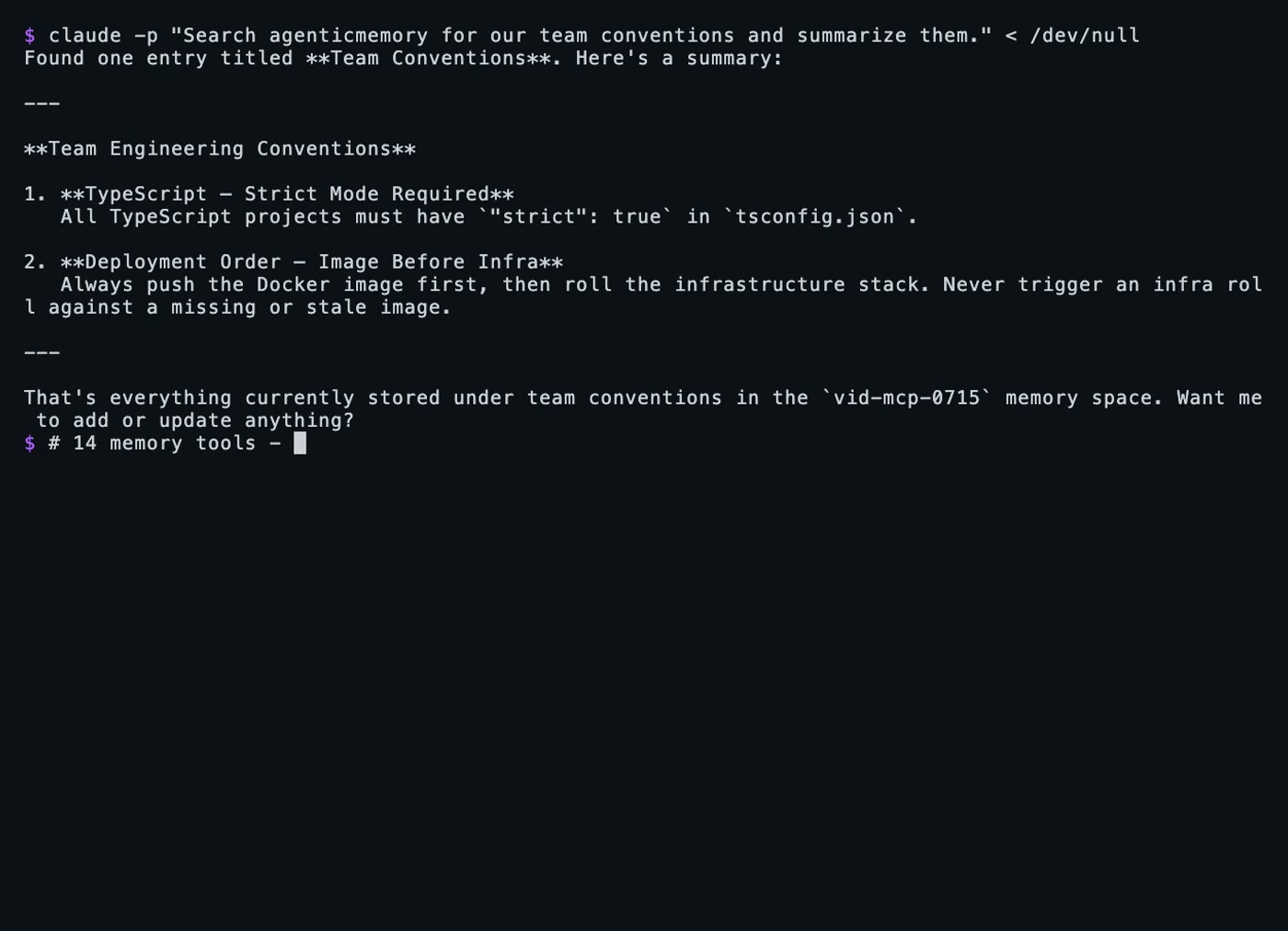
Claude Code remembering across sessions via MCP — click to watch.
For clients that use a JSON config (Cline, Cursor, Windsurf), pass your API key via the environment — the MCP server runs outside your project directory, so it won't pick up .agmry/config.json:
{
  "mcpServers": {
    "agenticmemory": {
      "command": "agmry",
      "args": ["mcp-serve"],
      "env": { "AGMRY_API_KEY": "amk_your_key_here" }
    }
  }
}
Remote MCP — zero install
Claude Web, Claude Desktop, Raycast, or any hosted MCP client can connect straight to the remote server. Same tools, same API key, nothing to install:
URL:  https://mcp.agenticmemory.ai/sse
Auth: Authorization: Bearer YOUR_API_KEY
End-to-end encryption (zero-knowledge spaces)
Create a space the server can never read. Encryption happens inside the CLI — the API only ever sees ciphertext.
agmry key generate                                  # one-time: creates + saves your key
agmry space create "Private" private --encryption e2e

agmry store SPACE "my secret"                       # encrypted before it leaves your machine
agmry recall SPACE                                  # transparently decrypted
agmry key verify SPACE                              # holding the right key?
Or derive per-space keys from a passphrase instead of storing a key:
agmry key set --passphrase "long secret phrase"
Notes:
- Semantic search is impossible on zero-knowledge spaces by design.
- Prefer encrypted at rest instead?
--encryption managed— the server encrypts your data at rest and every feature (search, summaries) keeps working. No client key needed. - Losing the key or passphrase means the data is unrecoverable. That's the point. Back it up:
agmry key show --reveal.
Key resolution order: --enc-key / --passphrase flag → AGMRY_ENCRYPTION_KEY env → ./.agmry/config.json → ~/.agmry/config.json. Same envelope and key derivation as the Node and Python SDKs — keys are interchangeable across all three.
Multi-agent: one brain, many agents
Spaces are shareable. One agent stores the deploy runbook; another recalls it a week later, from a different machine, over a different interface (CLI, MCP, or REST — same memory). Your agents hand off between sessions and between projects without you couriering context.
And you stay in the loop: everything your agents remember is browsable in a human dashboard.
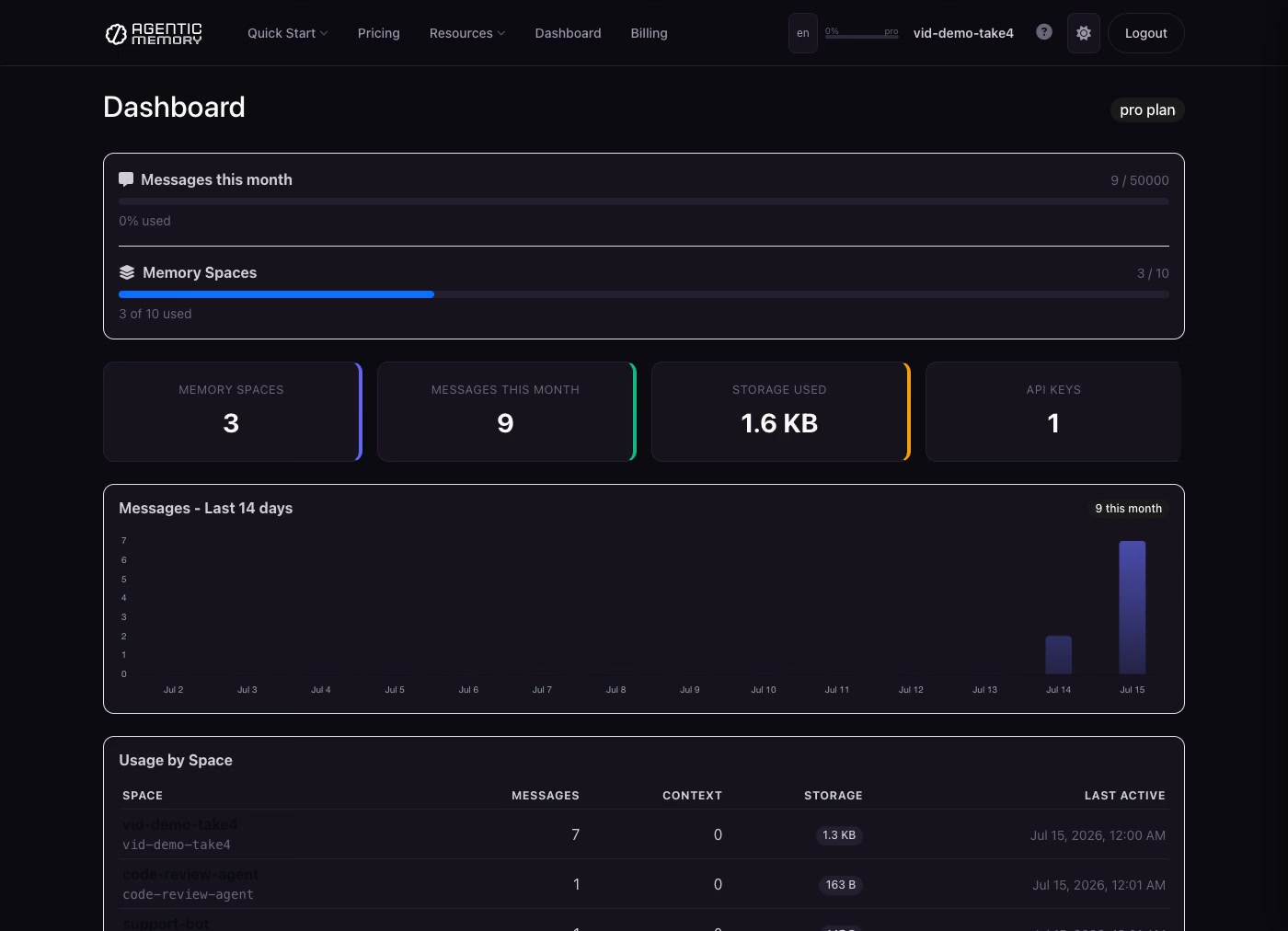
Everything your agents remember, in one dashboard — click to watch.
Queues — the agent bus
FIFO queues inside a space. One agent pushes work, another pops it — no polling glue, no extra infra.
agmry queue SPACE jobs push '{"task":"review PR #42"}'   # enqueue (FIFO)
agmry queue SPACE jobs pop                                # dequeue oldest — exit code 2 if empty
agmry queue SPACE jobs pop --wait 25                      # long-poll up to 25s for the next item
agmry queue SPACE jobs                                    # peek: length + head, without consuming
agmry queue SPACE jobs dlq push '{"task":"..."}' --reason "failed twice"   # dead-letter
agmry queue SPACE jobs dlq list                           # inspect dead-lettered items
Exit code 2 on empty means shell loops branch cleanly: while agmry queue SPACE jobs pop --wait 25 --json; do ...; done. Envelopes are opaque JSON — the server never inspects them.
Agent Integration
Add to your CLAUDE.md, .cursorrules, .clinerules, .windsurfrules, or AGENTS.md:
## Agentic Memory
This project uses Agentic Memory for persistent memory across sessions.
Use the `agmry` CLI. Key is in .agmry/config.json (auto-loaded).

agmry boot SPACE --json               # load everything at session start
agmry store SPACE "what happened"     # remember something
agmry ctx SPACE set key "value"       # store a durable decision/fact
agmry search SPACE "the deadline"     # find past context
agmry queue SPACE jobs push '{...}'   # send work to another agent
agmry queue SPACE jobs pop --wait 25  # receive work (exit 2 = empty)
Config Priority
--keyflagAGMRY_API_KEYenvironment variableAGENTICMEMORY_API_KEYenvironment variable./.agmry/config.json(project-local)~/.agmry/config.json(global)
Add .agmry/ to your .gitignore.
Features
- Conversation history — ordered, role-aware messages with recency windowing, sub-ms reads
- Key-value context — typed durable facts: decisions, preferences, runbooks
- Long-term entries — titled, tagged knowledge that survives months, with auto-summarisation
- Entities — people and systems the agent should know about
- Scratchpad — ephemeral working memory with TTLs (expiry is a feature)
- Semantic search — across everything the agent has ever stored
- Bootstrap — full session context in one call
- Agent self-signup — working API key from one CLI command, live for 48h keyless; $0 card-auth starts the free 7-day trial
- Queues — FIFO agent bus with long-poll and dead-letter,
agmry queue(exit 2 = empty) - MCP server — 17 tools, local (
agmry mcp-serve) or fully remote (mcp.agenticmemory.ai) - REST API — same memory on the request path of proxies and pipelines
- Multi-agent spaces — a fleet of agents reads and writes one memory
- End-to-end encryption — zero-knowledge spaces where only you hold the key (
agmry key generate) - Export — full data takeout per space, one command (
agmry space export)
Pricing: The agent's key works instantly — full access for 48h, no card. A $0 card-auth starts the free 7-day trial; after that from $24.99/mo. No data deletion, ever: your memory waits for you. Details.
Why not just Claude's built-in memory?
Claude Memory is great — but it only works with Claude, and only Claude decides what's in it.
| Agentic Memory | Claude Memory | |
|---|---|---|
| LLM support | Any — GPT, Claude, Gemini, Llama, Mistral, DeepSeek | Claude only |
| Switch LLMs | Keep all memory | Lose everything |
| Multi-agent | Shared spaces across agents | Single user |
| Programmatic control | Full CLI + MCP + REST | Black box — Claude decides |
| Structured data | Messages + context + entries + entities + scratchpad | Free-text notes |
| Semantic search | agmry search "the deadline" |
No search API |
| Data ownership | You own it, export any time | Stored by Anthropic |
Why this exists
I was my agents' memory. Every session started with me re-explaining my own project to my own tools — decisions, preferences, what broke last time. So I built the memory they run themselves. My own agents use it in production across a dozen projects; if something's rough or missing, open an issue — I read every one.
Documentation
- Quickstart guides — Claude Code, Cursor, LangChain, CrewAI, AutoGen + 7 more
- API docs
- Pricing
License
Proprietary — Tyga.Cloud Ltd. See LICENSE.
Install
Add agenticmemory to your client. Pick the one you use.
{
  "servers": {
    "agmry": {
      "type": "sse",
      "url": "https://mcp.agenticmemory.ai/sse"
    }
  }
}
Add to `.vscode/mcp.json` in your workspace.
claude mcp add agmry -- npx -y agmrycodex mcp add agmry -- npx -y agmryamp mcp add agmry -- npx -y agmry{
"mcpServers": {
"agmry": {
"command": "npx",
"args": [
"-y",
"agmry"
]
}
}
}Add to `claude_desktop_config.json`, then restart Claude Desktop.
{
  "mcpServers": {
    "agmry": {
      "command": "npx",
      "args": [
        "-y",
        "agmry"
      ]
    }
  }
}
Add to `~/.cursor/mcp.json`, or `.cursor/mcp.json` for a single project.
{
  "mcpServers": {
    "agmry": {
      "command": "npx",
      "args": [
        "-y",
        "agmry"
      ]
    }
  }
}
Add to `~/.codeium/windsurf/mcp_config.json`.
{
  "mcpServers": {
    "agmry": {
      "command": "npx",
      "args": [
        "-y",
        "agmry"
      ]
    }
  }
}
Add to `cline_mcp_settings.json` via the MCP Servers panel.
{
  "mcpServers": {
    "agmry": {
      "command": "npx",
      "args": [
        "-y",
        "agmry"
      ]
    }
  }
}
Add to `~/.gemini/settings.json`.
{
  "mcpServers": {
    "agmry": {
      "type": "local",
      "command": "npx",
      "args": [
        "-y",
        "agmry"
      ],
      "tools": [
        "*"
      ]
    }
  }
}
Add to `~/.copilot/mcp-config.json`, or run `/mcp add` inside the CLI.
{
  "context_servers": {
    "agmry": {
      "command": {
        "path": "npx",
        "args": [
          "-y",
          "agmry"
        ]
      }
    }
  }
}
Add to your Zed `settings.json`.
npx -y agmryRun `goose configure`, choose **Add Extension → Command-line Extension**, and paste this command.
Score
39 / 100
Incomplete
- Documentation25/25
- Maintenance16/25
- Trust6/20
- Capability0/15
- Install experience15/15
- Documents what it does and how to connect
- Has a resolvable package or endpoint
- Exposes at least one tool, prompt or resource
- README has substantive content
- Includes a code example
- Documents its configuration
- Mentions credentials or security posture
- Last commit 38 days ago
- Has a release history
- Repository is not archived
- No licence detected
- Namespace verified in the official MCP registry
- Claimed by its owner
- Published under an organisation
- 0 tool(s) documented
- Provides prompt templates
- Provides resources
- 18 documented install method(s)
- Published to a package registry
- Offers a hosted endpoint — no local install
Version history
| Versions | Published |
|---|---|
| 1.8.0Latest | Jul 24, 2026 |