
pypi datasaudi-mcpstdioMITupdated 2mo ago
Ask Claude, Cursor, or any MCP client about the Saudi economy — in plain English or Arabic. No API key. No database.
What can you do with datasaudi mcp?
datasaudi-mcp
Ask Claude, Cursor, or any MCP client about the Saudi economy — in plain English or Arabic. No API key. No database.




Ask it · Coverage · Install · العربية · Tools
GDP, inflation, trade, population, the real‑estate price index — 277 official GASTAT datasets, live from DataSaudi, answered right inside your AI client. You never name a dataset; the model finds it.
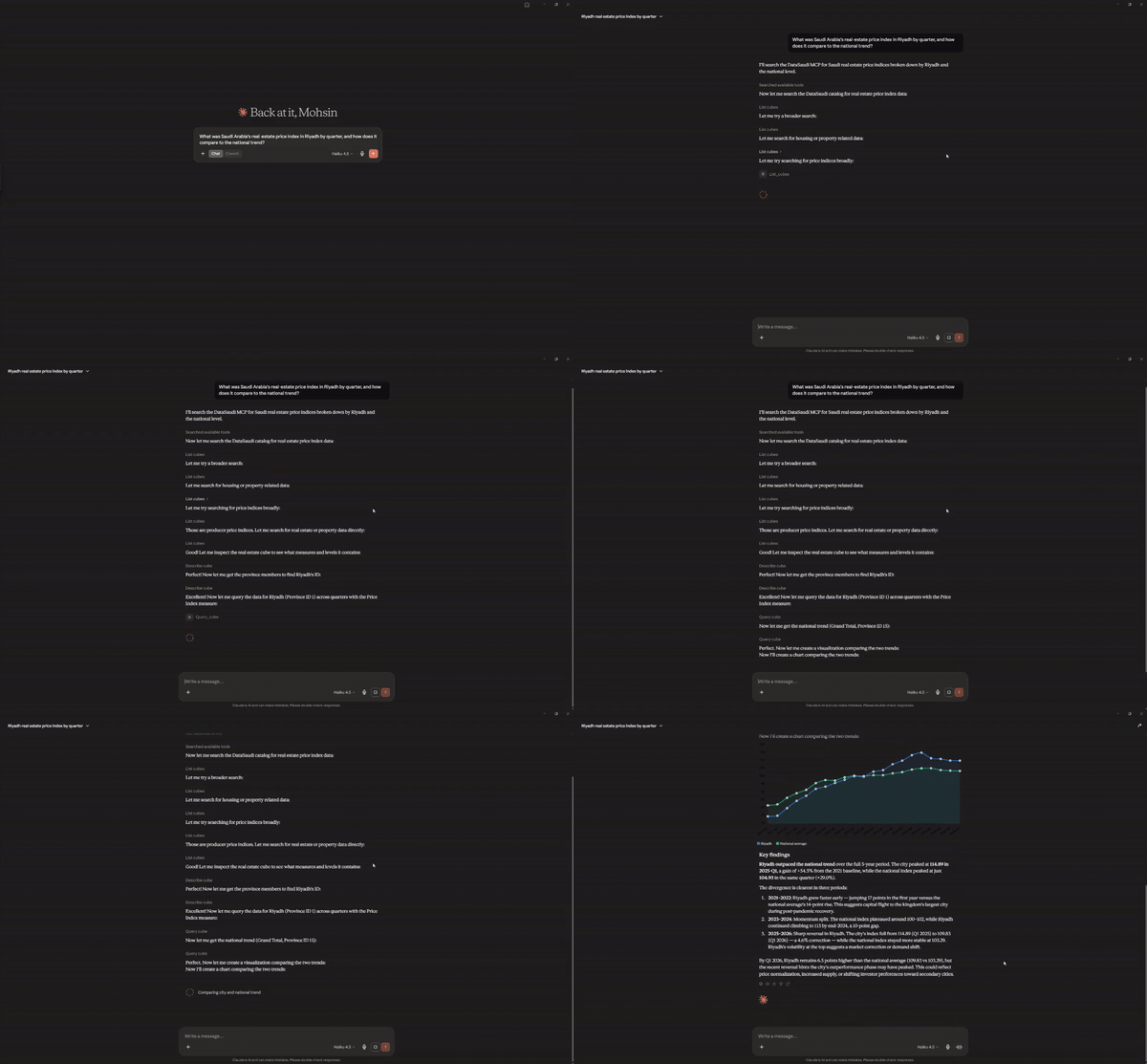
Here it is in Claude Desktop — one plain‑English question, and the model finds the dataset, pulls Riyadh's real‑estate price index against the national trend, and charts it:
Ask it anything
Connect it in about 2 minutes (Install), then just ask:
💬 "What was the real‑estate price index in Riyadh by quarter, and how does it compare to the national trend?"
💬 "Who are Saudi Arabia's top trading partners? Break foreign trade down by country and exports vs. imports."
🇸🇦 "اعرض الرقم القياسي لأسعار العقارات في الرياض حسب الربع" — ask in Arabic, get Arabic back (
الرياض,مكة المكرمة). See Arabic support.
The model discovers the right dataset, pulls the numbers, and answers. You don't need to know any dataset names or query syntax.
- "Show me inflation and the CPI by province for the latest year — which regions were highest?"
- "How has the real‑estate price index differed between villas and apartments over time?"
- "What's the population by province, split by sex and nationality (Saudi vs. non‑Saudi)?"
- "Show me real GDP by economic sector, quarter over quarter, with year‑on‑year growth."
- "Compare average monthly wages: Saudi vs. non‑Saudi, and men vs. women."
What you can ask about
277 curated GASTAT / DataSaudi datasets. Every query hits the live API, so the numbers are as current as GASTAT publishes.
📈 Economy
GDP (sector / expenditure / activity), CPI & inflation (national + by province), the Producer Price Index, FDI, foreign trade (country / product / flow), the trade balance, business & consumer confidence.
👥 Society
Population (province / sex / nationality / age), households & dwellings, wages, employment & participation rates, education, health, disability.
🏗️ Real estate
The price index by province and property type (villa / apartment / land), building permits, the construction cost index, housing tenure & type.
🌍 More
Tourism & hotel occupancy, energy & water, Hajj & Umrah, SAMA financial series, internationally‑reported (World Bank / UN) indicators.
[!IMPORTANT] Where it stops — on purpose. A data tool you can trust tells you its edges.
- Serves the real‑estate price index (base‑year 100) — not per‑deal prices in riyals (those live in MoJ / Srem).
- No MoJ transaction volumes, no REGA, no municipal / ZATCA / CMA data, no microdata. This is the ~277‑series headline‑indicator layer, not the full national corpus.
- Geographic detail stops at the province level for most series — no city / district breakdown.
Ask for something outside this and the server says so plainly, rather than guessing.
Install
No API key, nothing to configure — DataSaudi is keyless. You'll need
uv installed.
Claude Code — one line, no file editing:
claude mcp add datasaudi -- uvx datasaudi-mcp
Settings → Developer → Edit Config, add the block below, then completely quit and reopen
Claude Desktop (fully quit from the tray — not just close the window):
{
  "mcpServers": {
    "datasaudi": {
      "command": "uvx",
      "args": ["datasaudi-mcp"]
    }
  }
}
Settings → Tools & MCP → New MCP Server (or edit ~/.cursor/mcp.json), same block:
{
  "mcpServers": {
    "datasaudi": {
      "command": "uvx",
      "args": ["datasaudi-mcp"]
    }
  }
}
Then ask one of the questions above.
Arabic support
Saudi data in Arabic, as a first‑class feature — not an afterthought.
- Ask in Arabic, get Arabic back. Member names return in Arabic script:
الرياضfor Riyadh,مكة المكرمةfor Makkah,المنطقة الشرقيةfor the Eastern Region. - Catalog search works in Arabic too — an Arabic term matches the datasets' Arabic topic / source annotations.
- Numbers and structure are identical across languages — only the human‑readable captions change.
The tools
Three tools do the work; the model calls them for you.
| Tool | What it does |
|---|---|
list_cubes |
Search the 277‑dataset catalog by keyword (English or Arabic). |
describe_cube |
Show one dataset's breakdown dimensions and measures. |
query_cube |
Run a validated query and return tidy rows — with the query echoed back and honest paging. |
- Did you fully quit and reopen the app? (Closing the window isn't enough — quit from the tray.)
- Is your config valid JSON? A stray comma breaks the whole file — paste it into a JSON validator.
- Is
uvinstalled and on your PATH? Runuvx --versionin a terminal. - Check the client's MCP / tools panel for an error message next to
datasaudi.
Data comes live from api.datasaudi.sa (the DataSaudi Tesseract API, operated by the
Ministry of Economy & Planning; data produced by GASTAT). The server holds no local copy
— every query is fetched fresh, so results are always as current as DataSaudi itself. Only
the lightweight dataset catalog is cached in memory for the session.
DataSaudi's data‑usage terms are set by its operator; this project is an independent open‑source client and attributes GASTAT / MEP as the source. Please review DataSaudi's terms for your use case.
Contributing
Contributions welcome — see CONTRIBUTING.md. To develop locally:
git clone https://github.com/mohsinmshabbir/datasaudi-mcp
cd datasaudi-mcp
uv sync --all-extras
uv run pytest -m "not live"    # offline test suite
uv run pytest -m live          # optional: hits the real API
License
MIT — see LICENSE.
Install
Add datasaudi mcp to your client. Pick the one you use.
claude mcp add datasaudi-mcp -- uvx datasaudi-mcpcodex mcp add datasaudi-mcp -- uvx datasaudi-mcpamp mcp add datasaudi-mcp -- uvx datasaudi-mcp{
"mcpServers": {
"datasaudi-mcp": {
"command": "uvx",
"args": [
"datasaudi-mcp"
]
}
}
}Add to `claude_desktop_config.json`, then restart Claude Desktop.
{
  "mcpServers": {
    "datasaudi-mcp": {
      "command": "uvx",
      "args": [
        "datasaudi-mcp"
      ]
    }
  }
}
Add to `~/.cursor/mcp.json`, or `.cursor/mcp.json` for a single project.
code --add-mcp '{"name":"datasaudi-mcp","command":"uvx","args":["datasaudi-mcp"]}'Or add the block manually to `.vscode/mcp.json` under `servers`.
{
  "mcpServers": {
    "datasaudi-mcp": {
      "command": "uvx",
      "args": [
        "datasaudi-mcp"
      ]
    }
  }
}
Add to `~/.codeium/windsurf/mcp_config.json`.
{
  "mcpServers": {
    "datasaudi-mcp": {
      "command": "uvx",
      "args": [
        "datasaudi-mcp"
      ]
    }
  }
}
Add to `cline_mcp_settings.json` via the MCP Servers panel.
{
  "mcpServers": {
    "datasaudi-mcp": {
      "command": "uvx",
      "args": [
        "datasaudi-mcp"
      ]
    }
  }
}
Add to `~/.gemini/settings.json`.
{
  "mcpServers": {
    "datasaudi-mcp": {
      "type": "local",
      "command": "uvx",
      "args": [
        "datasaudi-mcp"
      ],
      "tools": [
        "*"
      ]
    }
  }
}
Add to `~/.copilot/mcp-config.json`, or run `/mcp add` inside the CLI.
{
  "context_servers": {
    "datasaudi-mcp": {
      "command": {
        "path": "uvx",
        "args": [
          "datasaudi-mcp"
        ]
      }
    }
  }
}
Add to your Zed `settings.json`.
uvx datasaudi-mcpRun `goose configure`, choose **Add Extension → Command-line Extension**, and paste this command.
Score
39 / 100
Incomplete
- Documentation25/25
- Maintenance16/25
- Trust13/20
- Capability0/15
- Install experience12/15
- Documents what it does and how to connect
- Has a resolvable package or endpoint
- Exposes at least one tool, prompt or resource
- README has substantive content
- Includes a code example
- Documents its configuration
- Mentions credentials or security posture
- Last commit 53 days ago
- Has a release history
- Repository is not archived
- Licensed MIT
- Namespace verified in the official MCP registry
- Claimed by its owner
- Published under an organisation
- 0 tool(s) documented
- Provides prompt templates
- Provides resources
- 12 documented install method(s)
- Published to a package registry
- Offers a hosted endpoint — no local install
Version history
| Versions | Published |
|---|---|
| 0.1.0Latest | Jul 9, 2026 |