pypi no-humanstdioupdated 19d ago
From ticket to reviewed pull request. Free and open-source, on your machine.
What can you do with no human?
no_human
From ticket to reviewed pull request.Free and open-source, on your machine.


getnohuman.com · Quickstart · Docs · Watch it work a sprint



▶ Watch the loop — a ticket in, a reviewed pull request out; the whole loop in 57 seconds.
The AI coding factory you can trust:
- A plan before any code, from the ticket plus what it finds in your repo. When planning fails, the coder is told it is working without one; when the change is judged trivial the plan is skipped without telling the coder, by design — the skip is still stated in the run's event stream.
- An adversarial review. A different model, in a session that never saw the coder's transcript, told to refute "done". You get a pass/fail checklist citing file and line — never a numeric self-score.
- A tamper guard. Deleted tests, new skips, an assertion turned into a tautology — counted mechanically before the review gate runs, then justified against your acceptance criteria or the attempt stops.
- Proof the fix fixed the bug. The tests offered as evidence must fail at
the merge base and pass on the new tree — the reproduction gate runs both.
Out of the box that binds a Python bug fix;
repro_gate.mode: requiredbinds every kind and every change. - Your tests run, locally and optionally through your CI — and a PR that found no test command says NOT RUN on its face.
- An honest stop. When it cannot finish it stops and says why — a specific question when your answer would unblock it, a structured record when it has simply run out of budget — never an invented plausible diff.
Install
One line (CLI + board)
uv tool install no-human   # or: pipx install no-human — the wheel ships the board
nh init && nh doctor       # token, config, first repo; then prove the install is real
Desktop app
Each release ships a SHA-256 alongside the artifact. Platform notes and the first-run walk-through: docs/quickstart.md.
From source
git clone https://github.com/no-human-ai/no_human.git && cd no_human
uv sync                 # installs the `nh` entry point into .venv
(cd web && npm install && npm run build)   # builds the board (cold first install can take minutes)
uv run nh init          # token, config, first repo (about 2 minutes)
uv run nh doctor        # verify the install is real before relying on it
The web build is not optional if you want the board: a source checkout ships
no web/dist, so without it nh start serves the API only and renders no UI.
Needs Python 3.12+, uv, git, and Node with
npm for the board build.
Run one task
Run nh with no arguments for the shell: your lanes, a live event tail, and an
intake you describe a task to in plain English. Every command below still works.
nh                                   # the shell
nh start                             # board + worker on 127.0.0.1:8420
nh task add https://github.com/org/repo/issues/42 --repo ~/git/repo
nh status                            # needs-you / working / waiting / done
nh review <id>                       # the reviewer's evidence checklist
nh diff <id>                         # the diff it wants to ship
nh approve <id>                      # your approval squash-lands the PR (git.approve_identity)
nh reject <id> --reason "..."        # send it back with feedback
Integrations
Point no_human at the tracker you already use and it pulls the tickets to your board — a tracker's filter lives in your config, never in a task's own text, and a transport error logs and retries on the next tick instead of crashing the pool.
| Tracker | How tickets arrive | Filter you configure |
|---|---|---|
| Jira Cloud | Polled via REST search/jql (HTTP Basic email:token) |
integrations.jira.jql |
| Linear | Polled via the GraphQL API | integrations.linear.team_key + state_types + label |
| monday.com | Polled via GraphQL v2 | integrations.monday.board_id + status_column + todo_labels |
With write-back on (write_back, off by default), the ticket moves with the
task — matched by status category, type, or the label you name, never a
hard-coded transition id — and gets the PR link; a task that needs a human is commented on, never
transitioned. GitHub and
GitLab issues import as tasks by URL, and PRs or MRs open on your own host;
Slack and Teams get a message when a task needs you; Jenkins and CircleCI can
run your test layers and gate the loop. Setup for each:
docs/adapters.md.
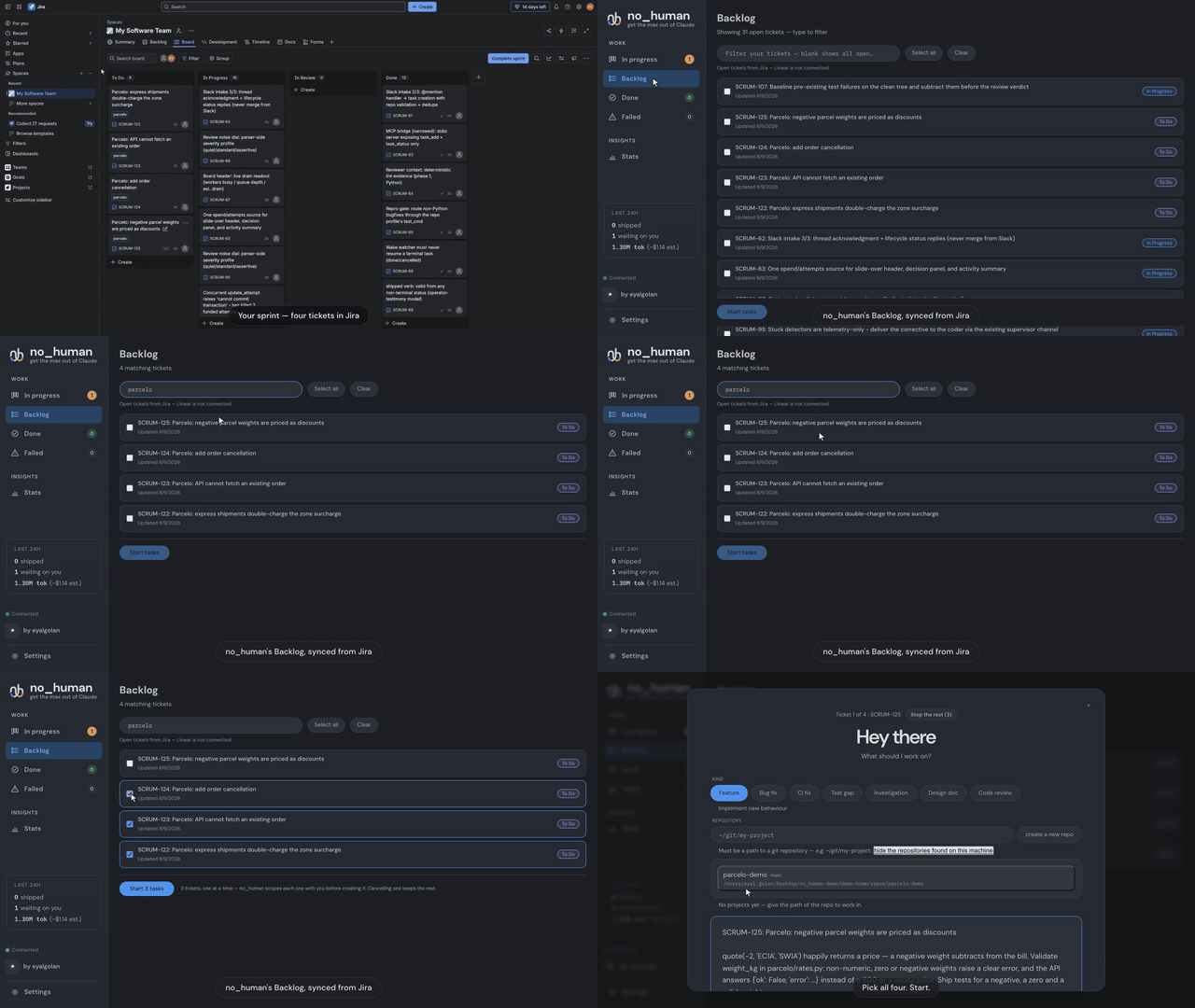
Watch the Jira flow end to end — tickets synced from a Jira board, scoped, implemented, and delivered as a review-passed pull request (click for the full video with every step):
MCP server — hand it work from the agent you are already in
no_human ships an MCP (Model Context Protocol) server: a stdio bridge, built on the official Python MCP SDK, that lets Claude Code, Cursor or any MCP client file work with your local no_human and check on it.
nh mcp-serve # the MCP server, over stdio
Two tools, and no more:
| Tool | What it does |
|---|---|
task_add(title, description, repo_path) |
Files a task. no_human then plans it, writes the change, runs your tests, has a second model review it, and opens the pull request. |
task_status(task_id_or_external_id) |
Returns that task's current state — status, attempts, the PR link once there is one. |
It talks to your own no_human at http://127.0.0.1:8420 and nothing else: no
auth, because that address is localhost, and no service of ours in between. For
Claude Code, the same server ships as a plugin — this repository is its own
plugin marketplace, so the two tools appear in your session after:
/plugin marketplace add no-human-ai/no_human
/plugin install no-human@no-human-ai
Any other MCP client takes the usual stdio entry:
// .mcp.json
{ "mcpServers": { "no_human": { "command": "nh", "args": ["mcp-serve"] } } }
Docs
| quickstart.md | Zero to first task, per platform |
| configuration.md | Every setting and default |
| verification.md | The gates, the bounded loop, the limits |
| security.md | Auth boundary, the never-merge rule, guards |
| blockers.md | Escalation, wake watcher, nh reply |
| adapters.md | Intake, context, VCS and CI backends |
| eval.md | Golden set, replay scoring, shadow mode |
| CHANGELOG.md | What changed, per release |
Development
uv sync
uv run pytest -q
uv run nh --help
Issues and pull requests welcome; run uv run pytest -q before submitting.
If no_human saved you a review cycle, a star helps other people find it:

License
MIT — see LICENSE. The licence covers the code, not the name: TRADEMARK.md is the policy on using "no_human" and the logo. Packaging a binary carries obligations the source tree does not, listed in THIRD-PARTY-NOTICES.md.
Install
Add no human to your client. Pick the one you use.
claude mcp add no-human -- uvx no-humancodex mcp add no-human -- uvx no-humanamp mcp add no-human -- uvx no-human{
"mcpServers": {
"no-human": {
"command": "uvx",
"args": [
"no-human"
]
}
}
}Add to `claude_desktop_config.json`, then restart Claude Desktop.
{
  "mcpServers": {
    "no-human": {
      "command": "uvx",
      "args": [
        "no-human"
      ]
    }
  }
}
Add to `~/.cursor/mcp.json`, or `.cursor/mcp.json` for a single project.
code --add-mcp '{"name":"no-human","command":"uvx","args":["no-human"]}'Or add the block manually to `.vscode/mcp.json` under `servers`.
{
  "mcpServers": {
    "no-human": {
      "command": "uvx",
      "args": [
        "no-human"
      ]
    }
  }
}
Add to `~/.codeium/windsurf/mcp_config.json`.
{
  "mcpServers": {
    "no-human": {
      "command": "uvx",
      "args": [
        "no-human"
      ]
    }
  }
}
Add to `cline_mcp_settings.json` via the MCP Servers panel.
{
  "mcpServers": {
    "no-human": {
      "command": "uvx",
      "args": [
        "no-human"
      ]
    }
  }
}
Add to `~/.gemini/settings.json`.
{
  "mcpServers": {
    "no-human": {
      "type": "local",
      "command": "uvx",
      "args": [
        "no-human"
      ],
      "tools": [
        "*"
      ]
    }
  }
}
Add to `~/.copilot/mcp-config.json`, or run `/mcp add` inside the CLI.
{
  "context_servers": {
    "no-human": {
      "command": {
        "path": "uvx",
        "args": [
          "no-human"
        ]
      }
    }
  }
}
Add to your Zed `settings.json`.
uvx no-humanRun `goose configure`, choose **Add Extension → Command-line Extension**, and paste this command.
Score
39 / 100
Incomplete
- Documentation25/25
- Maintenance19/25
- Trust6/20
- Capability0/15
- Install experience12/15
- Documents what it does and how to connect
- Has a resolvable package or endpoint
- Exposes at least one tool, prompt or resource
- README has substantive content
- Includes a code example
- Documents its configuration
- Mentions credentials or security posture
- Last commit 11 days ago
- Has a release history
- Repository is not archived
- No licence detected
- Namespace verified in the official MCP registry
- Claimed by its owner
- Published under an organisation
- 0 tool(s) documented
- Provides prompt templates
- Provides resources
- 12 documented install method(s)
- Published to a package registry
- Offers a hosted endpoint — no local install
Version history
| Versions | Published |
|---|---|
| 0.1.4Latest | Aug 20, 2026 |
| 0.1.3 | Aug 20, 2026 |