
pypi yade-mcpstdioMITupdated 11d ago
O.engines += [LLM()] # yet another engine.
What can you do with YADE MCP Server?
yade-mcp


O.engines += [LLM()] # yet another engine.
yade-mcp connects AI agents to YADE — the open-source discrete element method engine — through the Model Context Protocol. Browse API docs, run simulations, and execute code, all through natural conversation.
Your agent doesn't just call tools — it sits at your YADE console, runs long simulations on its own, and stays in sync with what you're doing.
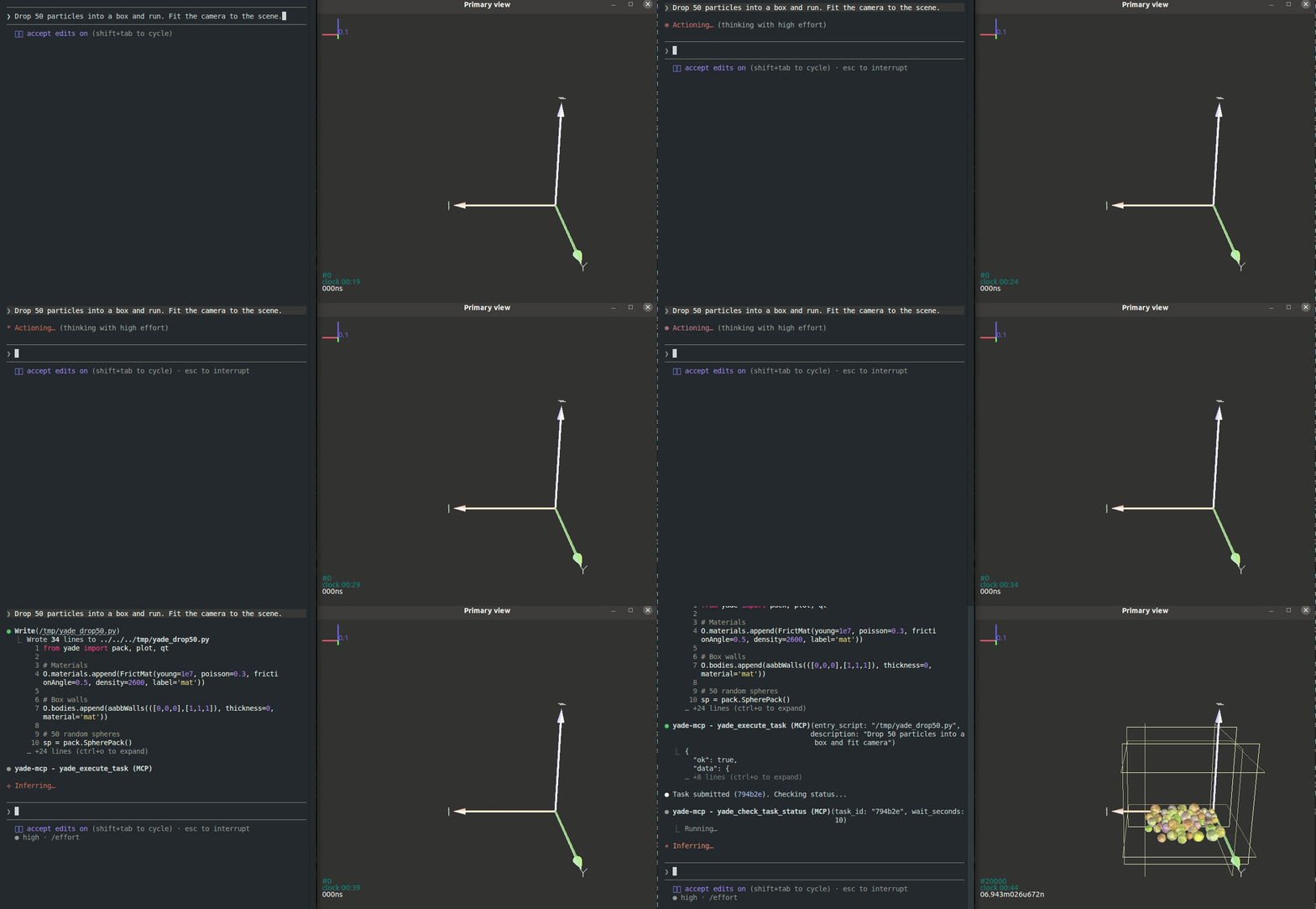
Works with any MCP client — verified with Claude Code, Codex CLI, Gemini CLI, GitHub Copilot CLI, OpenCode, and toyoura-nagisa.
Features
Your agent types, YADE runs
Powered by yade_execute_code
Describe what you want in plain language. The agent types commands into your YADE console — inspecting particles, tweaking parameters, stepping the engine, analyzing results. It reads each output, debugs, and iterates, the same way you do at the console yourself.
Set it running, walk away
Powered by yade_execute_task + yade_check_task_status + yade_interrupt_task
Run a full YADE script as a background task — just like firing off yade script.py, except you don't have to babysit it. The agent watches on its own: tailing the live output, catching errors as they appear, stopping the run gracefully when something looks off, fixing the script, and resubmitting — until the simulation actually finishes.
New session, no cold start
Powered by yade_list_tasks + yade_check_task_status
Every task you've submitted — the script, the live output, the final state — stays on record. When the context window fills up or you come back the next day, a fresh agent walks into a project that already remembers itself: it lists what's been run, reads what each task produced, and picks up without you re-explaining anything.
A live shell into the running simulation
Powered by yade_execute_code
While a task runs, the agent has a live shell into the simulation — ask it to inspect any variable, dump any object's state, or render a fresh plot on demand, without editing the script or stopping the run.
You type, the agent's in sync
Beyond submitted tasks, every line you type into the YADE console — the variables you peeked at, the parameters you tested, the dead ends you walked away from — flows into the agent's context too. When you turn to chat, it already has the trail of what you've been trying. Learning YADE and want feedback on what you just typed? Stuck on an unexpected error? Just ask — the agent saw what you typed and how YADE answered.
Tools (7)
Two documentation tools (no bridge) and five execution tools (bridge required):
| Tool | Purpose | Bridge |
|---|---|---|
yade_browse_api |
Walk the YADE Python class tree | No |
yade_query_api |
BM25 keyword search across the API | No |
yade_execute_code |
Run Python in the live YADE process; returns synchronously | Yes |
yade_execute_task |
Submit a script as a long-running background task | Yes |
yade_check_task_status |
Inspect a running or finished task (output, status) | Yes |
yade_interrupt_task |
Gracefully stop a running task | Yes |
yade_list_tasks |
List submitted tasks with metadata | Yes |
Quick Start
Prerequisites
Agentic Setup (Recommended)
Copy this to your AI agent and let it self-configure:
Fetch and follow this bootstrap guide end-to-end:
https://raw.githubusercontent.com/yusong652/yade-mcp/master/docs/agentic/yade-mcp-bootstrap.md
Manual Setup
1. Register the MCP server in your client config:
{
  "mcpServers": {
    "yade-mcp": {
      "command": "uvx",
      "args": ["yade-mcp"]
    }
  }
}
2. Start the bridge inside YADE:
In a YADE Python console, install the bridge using YADE's own interpreter:
import sys, subprocess
subprocess.check_call([sys.executable, "-m", "pip", "install", "--user", "yade-mcp-bridge"])
On PEP 668 externally-managed environments (pip refuses --user), see the bootstrap guide for a portable form.
Restart YADE, then in the Python console:
import yade_mcp_bridge
yade_mcp_bridge.start()
Verify
Restart your AI agent (Claude Code, Codex CLI, Gemini CLI, etc.) and ask it to call yade_execute_code to verify the connection.
Contributing
See CONTRIBUTING.md for development setup and guidelines.
License
MIT — see LICENSE.
Install
Add YADE MCP Server to your client. Pick the one you use.
claude mcp add yade-mcp -- uvx yade-mcpcodex mcp add yade-mcp -- uvx yade-mcpamp mcp add yade-mcp -- uvx yade-mcp{
"mcpServers": {
"yade-mcp": {
"command": "uvx",
"args": [
"yade-mcp"
]
}
}
}Add to `claude_desktop_config.json`, then restart Claude Desktop.
{
  "mcpServers": {
    "yade-mcp": {
      "command": "uvx",
      "args": [
        "yade-mcp"
      ]
    }
  }
}
Add to `~/.cursor/mcp.json`, or `.cursor/mcp.json` for a single project.
code --add-mcp '{"name":"yade-mcp","command":"uvx","args":["yade-mcp"]}'Or add the block manually to `.vscode/mcp.json` under `servers`.
{
  "mcpServers": {
    "yade-mcp": {
      "command": "uvx",
      "args": [
        "yade-mcp"
      ]
    }
  }
}
Add to `~/.codeium/windsurf/mcp_config.json`.
{
  "mcpServers": {
    "yade-mcp": {
      "command": "uvx",
      "args": [
        "yade-mcp"
      ]
    }
  }
}
Add to `cline_mcp_settings.json` via the MCP Servers panel.
{
  "mcpServers": {
    "yade-mcp": {
      "command": "uvx",
      "args": [
        "yade-mcp"
      ]
    }
  }
}
Add to `~/.gemini/settings.json`.
{
  "mcpServers": {
    "yade-mcp": {
      "type": "local",
      "command": "uvx",
      "args": [
        "yade-mcp"
      ],
      "tools": [
        "*"
      ]
    }
  }
}
Add to `~/.copilot/mcp-config.json`, or run `/mcp add` inside the CLI.
{
  "context_servers": {
    "yade-mcp": {
      "command": {
        "path": "uvx",
        "args": [
          "yade-mcp"
        ]
      }
    }
  }
}
Add to your Zed `settings.json`.
uvx yade-mcpRun `goose configure`, choose **Add Extension → Command-line Extension**, and paste this command.
7 tools
YADE MCP Server exposes 7 tools to a connected agent.
- yade_browse_api
- Walk the YADE Python class tree
- yade_query_api
- BM25 keyword search across the API
- yade_execute_code
- Run Python in the live YADE process; returns synchronously
- yade_execute_task
- Submit a script as a long-running background task
- yade_check_task_status
- Inspect a running or finished task (output, status)
- yade_interrupt_task
- Gracefully stop a running task
- yade_list_tasks
- List submitted tasks with metadata
Score
71 / 100
Good
- Documentation21/25
- Maintenance19/25
- Trust13/20
- Capability6/15
- Install experience12/15
- Documents what it does and how to connect
- Has a resolvable package or endpoint
- Exposes at least one tool, prompt or resource
- README has substantive content
- Includes a code example
- Documents its configuration
- Mentions credentials or security posture
- Last commit 3 days ago
- Has a release history
- Repository is not archived
- Licensed MIT
- Namespace verified in the official MCP registry
- Claimed by its owner
- Published under an organisation
- 7 tool(s) documented
- Provides prompt templates
- Provides resources
- 12 documented install method(s)
- Published to a package registry
- Offers a hosted endpoint — no local install
Version history
| Versions | Published |
|---|---|
| 0.1.5Latest | Apr 4, 2026 |